These days, life without home internet barely works. Whether it is your office job, the schooling of your children, entertainment, or even the security camera at your house’s entrance, almost everything requires the internet. However, considering the wide variety of deals and offers available, choosing the right home internet service is overwhelming.
This article will help you understand the basics of how internet speed operates, what kind of internet connection is suitable for your home, how to estimate costs, and which questions to ask before signing up.
What Are Home Internet Services?
Home internet service is a connection meant for use inside a house, not for an office or a business. It’s also called residential internet.
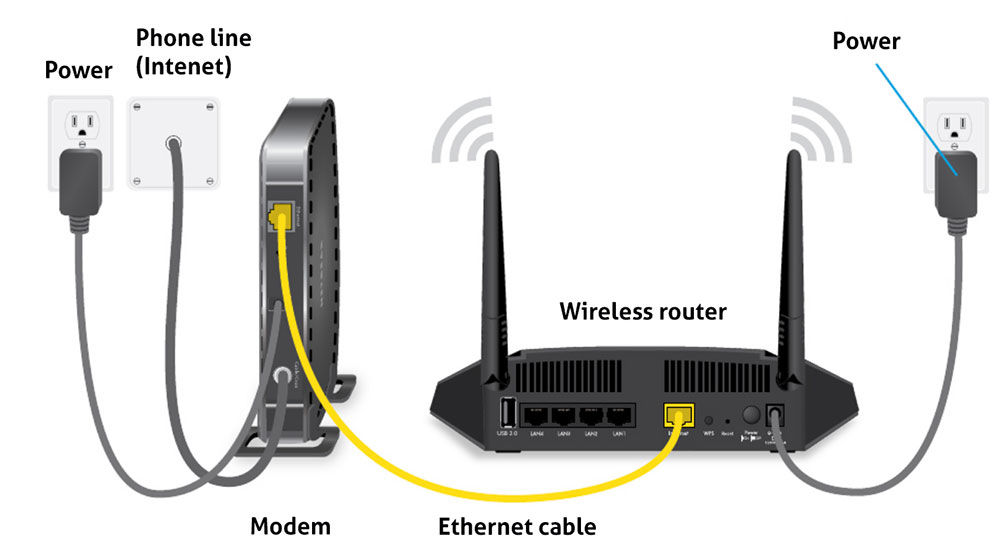
It usually works through a physical connection — a fiber cable, a coaxial cable, a phone line, or a wireless signal — that reaches your modem or router. From there, the router turns that connection into Wi-Fi and spreads it to every device in the house.
A residential user is simply an everyday household, a student, a freelancer, or someone running a small business from home — anyone using the internet for daily browsing, streaming, video calls, and work.
Why Reliable Home Internet Matters
A stable connection isn’t a luxury anymore — it’s a basic need. Here’s why:
- Remote work: Nobody likes a meeting that drops mid-sentence or a file upload that freezes halfway.
- Online learning: Live classes and video lectures need a connection that doesn’t cut out.
- Streaming: Constant buffering ruins a movie night fast.
- Gaming: A little lag is often the difference between winning and losing.
- Smart home devices: Smart bulbs, cameras, and door locks all need a solid connection to actually work right.
How to Choose the Right Internet Services Home Plan
Before picking a plan, figure out what your home actually needs. A few things worth thinking through:
- Users’ number: How many users will be active simultaneously.
- Devices’ number: Mobiles, notebooks, smart TVs, webcams – count all connected devices.
- Nature of use: Casual browsing, or intensive video streaming and gaming.
- Speed: What Mbps you need for daily activity.
- Cost: What price range is acceptable to you.
- Data allowance: Plan with unlimited data, or with restricted data amount.
- Contract: Whether you can afford long-term commitment, or prefer flexibility.
Understanding Internet Speed
Internet speed is measured in Mbps (Megabits per second). The higher the number, the faster data moves.
- Download speed: The rate at which files, videos or web pages are transferred to your computer.
- Upload speed: The rate at which data is sent from your computer, such as video calls and transferring files.
- Latency: The time delay between sending data and receiving a reply, known as ping. It is critical for gaming and video calls.
How Much Internet Speed Does a Home Need?
Basic Internet Use
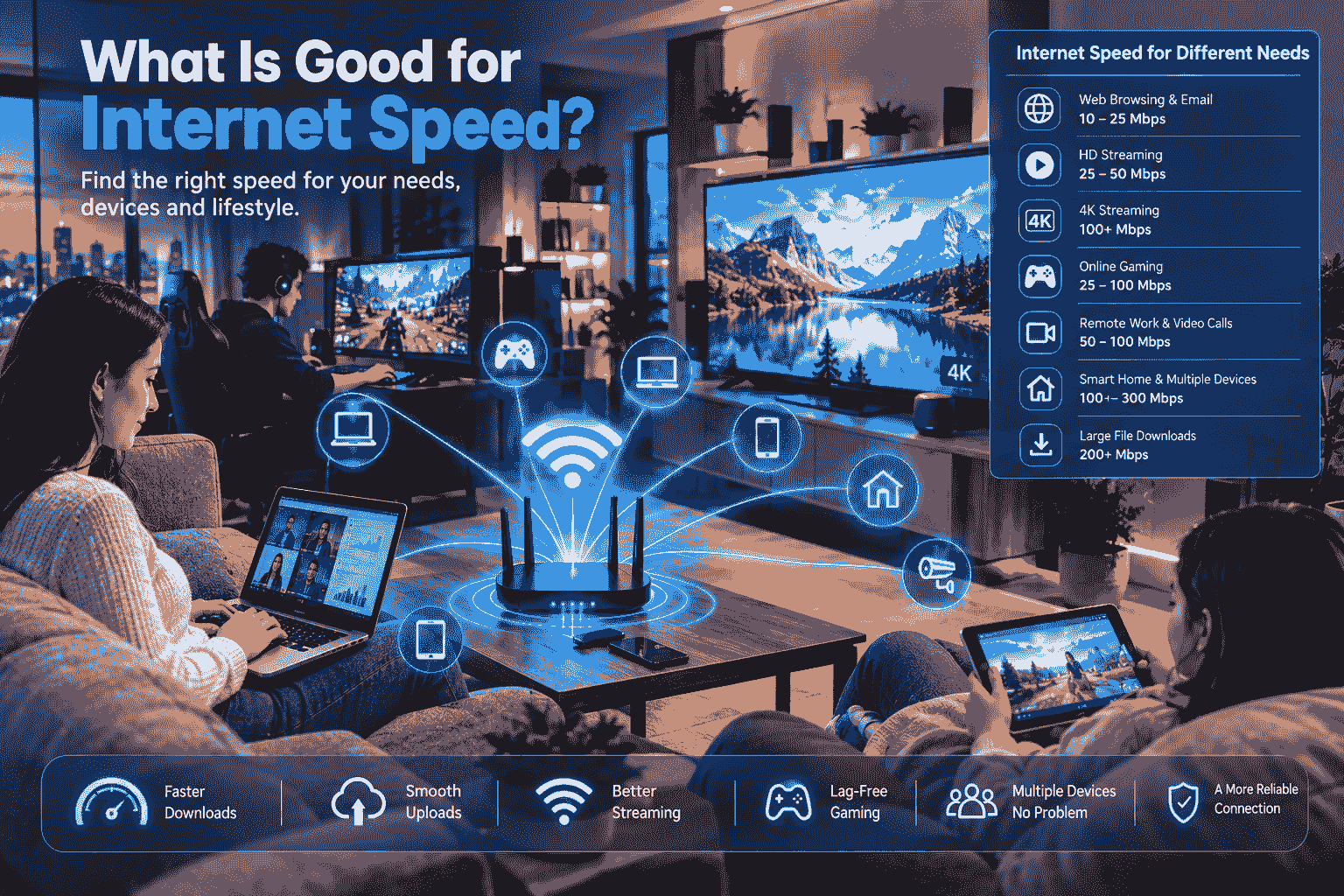
For checking email, browsing, and social media, 25–50 Mbps is plenty. This works well for a household of one or two people.
Moderate Internet Use
For HD streaming, video calls, and a handful of devices running at once, 100–200 Mbps is a solid range. It suits a mid-sized household of about three to four people sharing the connection.
Heavy Internet Use
For 4K streaming, large uploads and downloads, multiple gaming consoles, and a house full of smart devices, it’s worth getting 300 Mbps or more.
Types of Home Internet Services
Fiber Internet
Fiber internet sends data using light signals, which makes it the fastest and most reliable option available. Download and upload speeds are usually close to equal, which is great for video calls and sending large files.
Cable Internet
Cable internet runs over the same coaxial cable used for TV. It’s fairly fast and widely available in cities, though speed can dip during peak hours if a lot of people in the same area are online at once.
DSL Internet
DSL runs over telephone lines. It’s slower than fiber or cable, but in areas without other options, it’s still a workable choice.
Fixed Wireless Internet
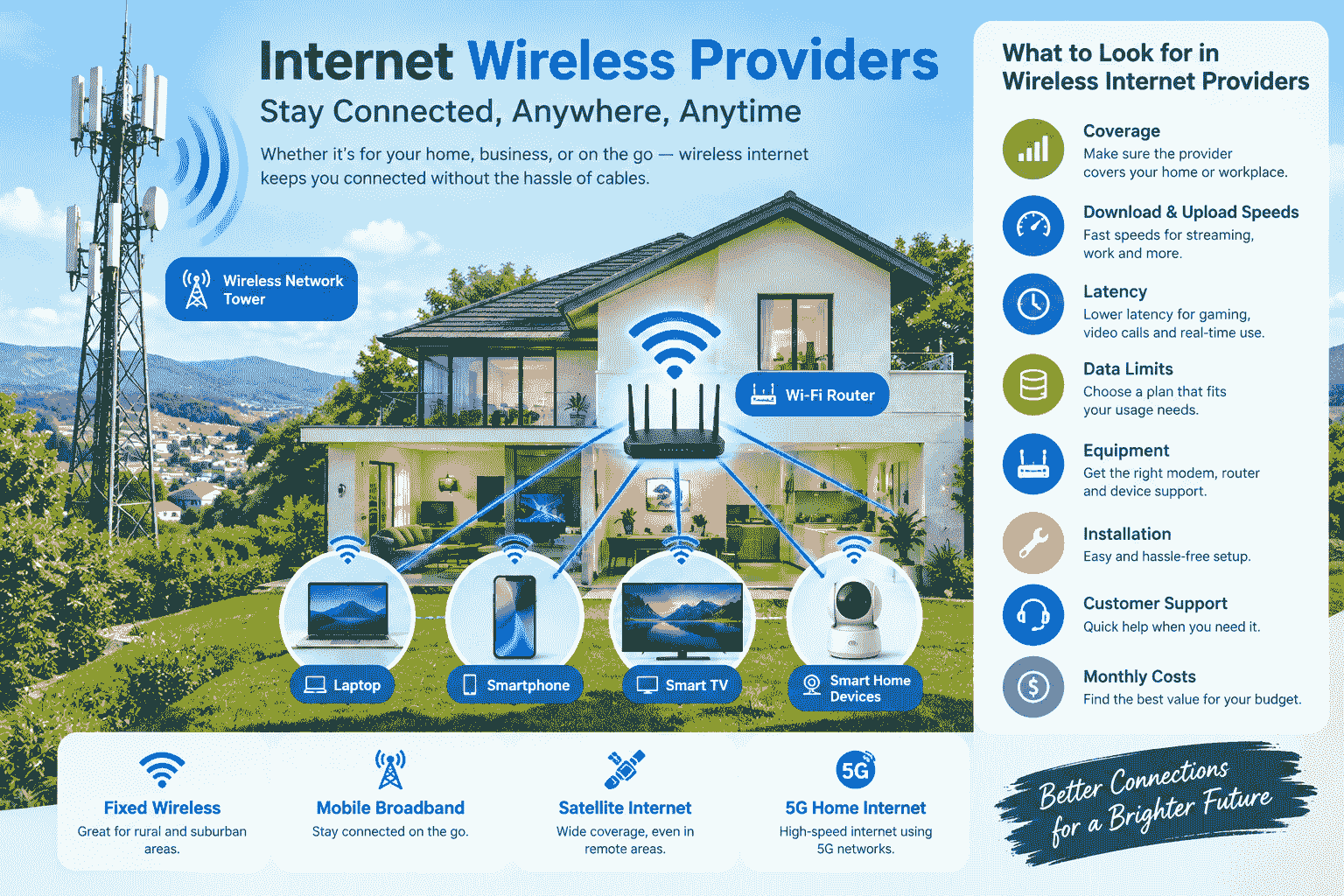
This type beams a signal from a tower directly to an antenna at your home. It’s a good fit for areas that cable or fiber haven’t reached yet.
Satellite Internet
Satellite internet comes from space, so it can reach even remote or rural areas. The trade-off is higher latency, which can cause noticeable delay in real-time gaming or video calls.
What Is the Difference Between Internet and Wi-Fi?
A lot of people use “internet” and “Wi-Fi” interchangeably, but they’re not the same thing.
- Internet is the global network that data travels across.
- Wi-Fi is the technology that delivers that internet connection to your devices without wires.
This is where the router comes in. The modem brings the internet connection into your home, and the router turns it into a Wi-Fi signal that reaches every device.
Choosing the Right Router
A good router makes a big difference in your Wi-Fi experience. Before buying one, check:
- Wi-Fi standard: Newer standards, like Wi-Fi 6, deliver faster and more stable connections.
- Coverage: Whether the router’s range actually matches the size of your home.
- Device capacity: How many devices it can handle at once.
- Security: Whether it supports modern security like WPA3.
- Mesh compatibility: Whether you can add a mesh system later if your home is large.
Improving Wi-Fi Coverage at Home
- Router placement: Put it in a central, open, and slightly elevated spot.
- Reducing interference: Keep it away from microwaves, cordless phones, and thick walls.
- Mesh Wi-Fi: For larger or multi-floor homes, a mesh system spreads signal evenly everywhere.
- Ethernet connection: For devices that stay put, like a desktop or smart TV, a wired connection gives you steadier speed.
Best Internet for Remote Work
For remote work, it’s not just download speed that matters — upload speed and stability count just as much.
- Stable connection: Random disconnects break your workflow.
- Upload speed: Good upload speed matters for file sharing and screen sharing.
- Video conferencing: You need enough bandwidth for clear video and audio.
- Low latency: Lower latency means faster, smoother responses.
Best Internet for Online Gaming
For players, it is not only about the speed but also latency and reliability.
- Latency: Low latency provides fast response times, which is crucial for games.
- Packet loss: Low packet loss ensures smooth gameplay.
- Ethernet: Wired connection is more stable than the wireless one.
- Stable connection: Stable connection prevents any abrupt disconnection from the game.
Internet for Streaming
- Streaming in HD: Typically requires about 5 to 10 Mbps.
- Streaming in 4K: Requires a minimum of 25 Mbps.
- Multiple screen setup: Streaming through multiple screens at one time means that the bandwidth required will be increased.
- Bandwidth requirements: In cases where the entire household is streaming simultaneously, a faster overall bandwidth is highly recommended.
Understanding Data Caps
A data cap is a limit on how much data you can use in a month. Go past it, and your speed might slow down, or you could get charged extra.
- Unlimited data: A good fit for anyone who streams or downloads heavily.
- Heavy usage: Households with lots of devices and users can burn through a data cap fast.
- Additional charges: Find out in advance what happens, cost-wise, if you go over the limit.
Comparing Internet Prices
Don’t judge a plan by the monthly bill alone. Watch out for:
- Promotional price: A discount that only applies for the first few months.
- Regular price: What you’ll actually pay once the promo period ends.
- Installation fee: The one-time cost of setting up a new connection.
- Equipment fee: A monthly charge if you’re renting a router or modem.
- Taxes: Government taxes that get added to your final bill.
- Hidden charges: Any extra fees buried in the fine print of the contract.
Contract vs. No-Contract Internet
Advantages of a contract plan: Usually cheaper, and sometimes bundled with better offers. Disadvantages: Canceling early can come with a penalty.
No-contract plans offer more flexibility — you can switch providers whenever you want — but they often cost a bit more.
Which is better for whom: If you’re staying in the same place for a while, a contract plan usually pays off. If you move often or just want flexibility, no-contract is the better fit.
Why Customer Support Matters
A great plan means little if the support behind it is bad.
- Technical support: Time taken to resolve any issues.
- Outage support: How quick the company is to respond during an outage.
- Billing support: How easy it is to rectify any billing mistakes.
- Customer reviews: Definitely worth looking into prior to engaging with a new company.
Internet Security for Your Home
- Strong Wi-Fi password: Avoid anything easy to guess.
- Router updates: Regular firmware updates improve security.
- Secure Wi-Fi: Use WPA3, or at least WPA2, encryption.
- Safe browsing: Stay away from unfamiliar links and websites.
How Many Devices Can a Home Internet Connection Support?
A typical home today connects a surprising number of devices:
- Smartphones
- Computers and laptops
- Smart TVs
- Gaming consoles
- Security cameras
- Other smart devices (bulbs, plugs, speakers, and so on)
A decent mid-range router can usually handle 20–30 devices. If you have more than that, a stronger router or a mesh system is worth it.
What to Do If Your Home Internet Is Slow
- Restart the router: Sometimes turning it off and back on solves it.
- Check the placement: Make sure it’s not stuck in a corner or behind furniture.
- Run a speed test: See what speed you’re actually getting right now using a tool like Speedtest.
- Try an Ethernet connection: This helps rule out whether the problem is with Wi-Fi specifically.
- Update the firmware: Check if the router’s software is up to date.
- Cut down interference: Move nearby electronics out of the way.
- Contact your ISP: If nothing helps, it’s time to get the provider involved.
Questions to Ask Before Choosing a Provider
- What speed is actually available at my address?
- What’s the monthly price?
- What will the price be after the promotional period ends?
- Do I need to buy my own router, or is it rented?
- Is there a data limit?
- How long is the contract?
- What’s the installation cost?
- What’s the policy during an outage?
How to Get Better Value From Your Home Internet
- Pick a plan based on what you actually need — don’t pay extra for speed you’ll never use.
- Review your current plan at least once a year; a better offer might be available now.
- Compare prices and perks across providers, since new-customer discounts are often worth chasing.
Why Location Matters
Not every internet service is available everywhere, so location matters more than people expect.
- Address-based availability: Even within the same city, different neighborhoods can have different providers or speeds. You can check what’s available at your address using the FCC National Broadband Map.
- Urban vs. rural: Cities usually have more options; rural areas tend to have fewer.
- Fiber availability: Fiber still hasn’t reached every area.
- Provider availability: Always check which providers actually serve your specific address.
Final Thoughts
Selecting the best Internet package is all about knowing yourself, meaning the number of users, their requirements, and even their budget constraints. It’s all about achieving the perfect balance between speed, reliability, and cost; otherwise, you may have to start all over again soon.
Frequently Asked Questions
What are internet services for home use?
These are internet connections built for residential use — browsing, streaming, gaming, and remote work inside a home, rather than a business.
What is a good internet speed for a home?
25–50 Mbps works for basic use, 100–200 Mbps suits a moderate household, and 300 Mbps or more is better for heavy use.
Is fiber internet good for a home?
Yes — fiber is the fastest and most reliable option, especially when it comes to upload speed and overall stability.
Does a better router make internet faster?
Not exactly. A router doesn’t increase your internet speed itself, but a good one improves Wi-Fi coverage and stability throughout your home.
Why is my Wi-Fi slow even though I have fast internet?
It could be router placement, an outdated device, interference, or simply too many devices connected at once.
Do I need unlimited data for home internet?
If your home does a lot of streaming, gaming, or has many connected devices, an unlimited plan is the safer choice.
Can I use my own router?
Yes, most providers allow this, and it usually saves you the monthly equipment rental fee.
How can I improve home Wi-Fi?
Place the router correctly, reduce interference, consider a mesh system, and use Ethernet where possible for stationary devices.
What is the most important factor when choosing home internet?
Understanding your own needs — how many users, what you’ll use it for — and finding the right balance between speed and price.
How do I find the best internet services home option?
Check which providers actually serve your address, compare their speeds and prices, and read customer reviews before deciding.
Next result :Frontier Internet Customer Service