Introduction
Selecting the correct hosting solution is essential when creating any site, application, online shop, or gaming service. At some point, a growing site or application will no longer perform adequately on shared hosting due to la ack of performance, security, or administrative control. Then a dedicated server solution can become a good option.
With the Just Host dedicated server solution, a user will get access to a powerful physical server allocated exclusively to his/her site or applications. This means that instead of splitting the server’s hardware resources between multiple clients, you will have exclusive access to its available CPU, RAM, storage, and network capabilities.
Dedicated hosting is ideal for businesses that need reliable performance, developers who want more control, sites that handle high traffic, and more. Dedicated server solutions are great for heavy applications, databases, game servers, and more.
In this guide, we will describe what a dedicated server is, how it works, its advantages, important features, usage scenarios, and selection criteria.
What Is a Dedicated Server?
A dedicated server is a physical server assigned to a single customer. Unlike shared hosting, the server’s resources are not divided among many unrelated websites.
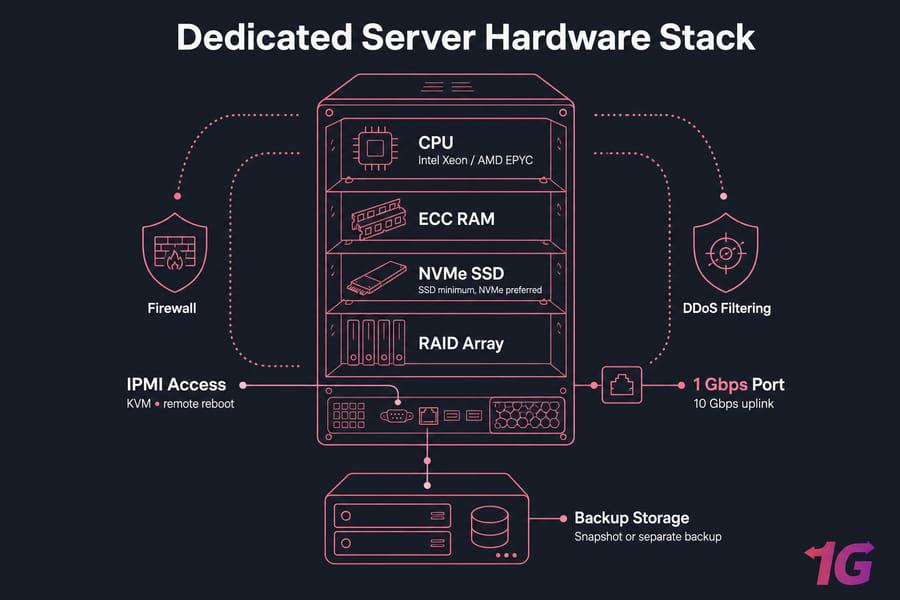
For example, a dedicated server may include:
- A powerful CPU
- Large amounts of RAM
- SSD or NVMe storage
- High-speed network connectivity
- Dedicated IP addresses
- Full or root-level server access
- Advanced security options
This setup provides much more control over the hosting environment.
When you host dedicated server workloads on a dedicated machine, you can configure the operating system, software, security settings, applications, and server resources according to your requirements.
Dedicated Server vs Shared Hosting
Shared hosting is designed for smaller websites and beginners. Multiple customers use the same physical server, so resources are shared.
A dedicated server is different because one customer receives the resources of an entire physical machine.
| Feature | Shared Hosting | Dedicated Server |
| CPU | Shared | Dedicated |
| RAM | Shared | Dedicated |
| Performance | Moderate | High |
| Control | Limited | High |
| Security | Standard | More customizable |
| Scalability | Limited | High |
| Suitable for | Small websites | High-traffic projects |
Why Choose a Just Host Dedicated Server?
There are various reasons that people choose to go for dedicated hosting.
One major benefit of this hosting type is the resource availability. The resources of your server are not used by other clients who use the same physical server.
This may allow you to get better performance, especially if your site receives many visitors.
Moreover, a dedicated server allows you to get more flexibility since you are able to choose an operating system, install any application, configure your server, and set up settings according to your project.
Key Features to Look For
Before choosing a dedicated hosting solution, it is important to understand the main features.
1. High-Performance CPU
The processor affects how quickly the server can handle requests and applications.
If your website runs databases, applications, gaming services, or other demanding workloads, choosing a strong CPU can make a significant difference.
2. Dedicated RAM
RAM allows the server to handle active processes and applications.
More RAM can be useful for:
- Large databases
- Multiple websites
- Gaming servers
- Business applications
- Virtual machines
- Development environments
3. SSD or NVMe Storage
The storage technology used also influences performance.
HDD-based storage has traditionally been slower compared to SSD storage. The latter provides fast access to stored data. In some cases, NVMe-based SSDs may provide even faster access to the stored data.
SSD or NVMe-based storage may be a great option for contemporary applications.
4. High-Speed Network
A server requires a good network connection to provide websites and applications to its users.
One should look for hosting that has good network connectivity, bandwidth, and infrastructure.
5. Root Access
Root or administrator access gives advanced users greater control over the server.
With appropriate access, you may be able to:
- Install applications
- Configure server software
- Manage users
- Adjust security settings
- Configure databases
- Manage services
However, root access should be used carefully because incorrect configuration can cause server problems.
6. Security
Security is yet another important factor.
A dedicated server enables you to configure various security parameters. You can use firewalls, authentication, security monitoring, software upgrades, and other such safeguards.
Benefits of Using a Dedicated Server
Better Performance
Your server’s resources will not be used by any other users, since they will be assigned to your projects only. This is particularly helpful for high-traffic websites and applications.
Greater Control
Dedicated hosting gives you more control over the server environment.
You can choose the operating system and install the software required by your project.
Improved Customization
Different websites have different requirements.
A dedicated server allows you to customize the environment according to your application, database, website, or business needs.
Better Resource Isolation
Your server resources are isolated from other customers.
This can provide more predictable performance compared with shared hosting.
Suitable for Growing Websites
As your website grows, it may require more resources.
A dedicated server can provide a strong foundation for websites that have outgrown basic hosting plans.
Who Should Use a Dedicated Server?
A dedicated server is not necessary for every website. Small blogs and simple business websites may work perfectly well with shared hosting or other affordable solutions.
However, dedicated hosting can be useful for:
E-Commerce Websites
Online stores need reliable performance because slow pages can affect the shopping experience.
Large e-commerce websites may benefit from dedicated resources for their databases, applications, and traffic.
High-Traffic Websites
Websites receiving large numbers of visitors may need more resources than basic hosting can provide.
A dedicated server can provide additional CPU, RAM, storage, and network capacity.
Gaming Servers
Games such as ARK, Minecraft, and other multiplayer applications can require significant resources.
Dedicated servers can provide the performance and control needed for demanding gaming environments.
Business Applications
Companies may use dedicated servers for internal applications, databases, CRM systems, and other business workloads.
Developers
Developers may need complete control over the server environment to test and deploy applications.
Just Host Dedicated Server for Gaming
Gaming is one of the popular use cases for dedicated servers.
A gaming server needs to process player connections, game data, world information, and other real-time activity.
A dedicated server can provide:
- Dedicated CPU resources
- More RAM
- Fast storage
- Network connectivity
- Greater configuration control
- Resource isolation
For example, if you want to host an ARK server, the required resources will depend on the number of players, game settings, mods, and server configuration.
The same principle applies to Minecraft and other multiplayer games.
Just Host Dedicated Server for Websites
Large websites can benefit from dedicated hosting when they need additional resources.
A dedicated environment can support:
- Multiple websites
- Large databases
- E-commerce platforms
- Content management systems
- High-traffic blogs
- Business applications
As an example, when dealing with WordPress sites, a dedicated server may be able to offer enough power to run WordPress, the database, plugins, cache systems, and all sorts of other things.
It should be noted that switching to a dedicated server will not immediately make a website work quickly, as other factors are involved.
How to Choose the Right Dedicated Server
Choosing the right configuration depends on your workload.
Start by identifying your requirements.
Step 1: Estimate Traffic
Determine how many visitors or users your website receives.
If traffic is increasing quickly, consider additional resources for future growth.
Step 2: Choose the CPU
Consider the number of CPU cores and processor performance.
Applications with heavy processing requirements may need a more powerful CPU.
Step 3: Select RAM
Choose enough RAM for your operating system, applications, databases, and expected traffic.
A small project may need less RAM, while large applications can require considerably more.
Step 4: Choose Storage
Choose HDD, SSD, or NVMe based on your workload.
For applications where fast disk access is important, SSD or NVMe storage may be preferable.
Step 5: Check Bandwidth
Make sure the server provides enough network capacity for your users.
Video, downloads, gaming, and high-traffic websites can consume significant bandwidth.
Step 6: Consider Security
Look for security features such as firewall support, monitoring, backups, DDoS protection, and secure authentication.
How to Set Up a Dedicated Server
Setting up a dedicated server generally involves several steps.
1. Select a Server Plan
Choose the CPU, RAM, storage, operating system, and network resources required by your project.
2. Install the Operating System
Common choices include Linux distributions and Windows Server.
The best option depends on the applications you plan to run.
3. Configure Security
Before deploying applications, configure:
- Firewall rules
- Strong passwords
- SSH security
- User permissions
- Security updates
- Monitoring
4. Install Required Software
Install your web server, database, programming environment, control panel, or other required applications.
5. Configure Your Website
Point your domain to the server’s IP address and configure DNS.
Then install and configure your website or application.
6. Monitor the Server
Monitor CPU usage, RAM, disk space, network traffic, and system logs.
Regular monitoring can help identify performance problems before they become serious.
Dedicated Server Security Tips
Security should always be a priority.
Here are some basic security practices:
- Use strong passwords.
- Keep the operating system updated.
- Install security patches quickly.
- Configure a firewall.
- Disable unnecessary services.
- Use secure authentication.
- Create regular backups.
- Monitor unusual activity.
- Use HTTPS for websites.
- Review user permissions regularly.
A dedicated server gives you more control, but that also means you may have more responsibility for server security.
How Much Does a Dedicated Server Cost?
The cost of a dedicated server depends on its hardware and included services.
Important pricing factors include:
- CPU model
- Number of CPU cores
- RAM
- Storage type
- Storage capacity
- Bandwidth
- Data-center location
- Operating system
- Managed or unmanaged service
- Backup options
- Security services
Basic dedicated servers are ideal for small-scale projects, whereas enterprise-grade servers come at a higher price due to their advanced features and hardware capabilities.
Don’t opt for the cheapest plan available; rather, analyze the available resources and features against your needs.
Managed vs Unmanaged Dedicated Server
There are two common approaches to dedicated hosting.
Managed Dedicated Server
With managed hosting, the provider handles many technical tasks.
This can include:
- Server updates
- Monitoring
- Security management
- Technical support
- Server configuration
Managed hosting is useful for customers who don’t want to handle every server administration task themselves.
Unmanaged Dedicated Server
With unmanaged hosting, you have more responsibility.
You may need to handle:
- Software installation
- Updates
- Security
- Server configuration
- Troubleshooting
It can be a good choice for experienced developers and system administrators who want maximum control.
Tips for Getting Better Performance
After choosing a dedicated server, you can take several steps to improve performance.
Use Caching
Caching can reduce repeated processing and improve website response times.
Optimize Databases
Large databases should be maintained and optimized regularly.
Compress Images
Large images can slow websites. Use optimized image formats and appropriate dimensions.
Keep Software Updated
Outdated software can create security and performance problems.
Monitor Resources
Check CPU, RAM, storage, and bandwidth usage regularly.
Use a CDN
A content delivery network can help deliver static content from locations closer to users.
Frequently Asked Questions
What is a dedicated server?
A dedicated server is a physical server assigned to one customer instead of being shared among multiple customers.
Is a dedicated server faster than shared hosting?
It can be. A dedicated server provides dedicated resources, which can offer more predictable performance than shared hosting.
Is a dedicated server good for gaming?
Yes. Dedicated servers can be suitable for multiplayer games because they provide dedicated resources and greater configuration control.
Can I host multiple websites on one dedicated server?
Yes. A sufficiently powerful dedicated server can host multiple websites and applications.
Do I need technical knowledge?
Some technical knowledge is helpful, especially with unmanaged dedicated servers. Managed hosting can reduce the amount of server administration required.
Is dedicated hosting suitable for small websites?
Usually, it may be more than a small website needs. Shared hosting, VPS hosting, or cloud hosting can often be more cost-effective for smaller projects.
Conclusion
A just host dedicated server solution can be a powerful choice for websites, applications, gaming communities, e-commerce platforms, and businesses that require dedicated resources and greater control.
Unlike shared hosting, a dedicated server provides an entire physical machine for your projects. This can provide better resource isolation, greater customization, and predictable performance.
Before choosing a server, consider your CPU, RAM, storage, bandwidth, security, operating system, and management requirements. You should also think about future growth so that your server can continue supporting your project as traffic increases.
The right dedicated server is not simply the one with the highest specifications. It is the one that provides the resources and features your workload actually needs.