










Introduction
Modern businesses need reliable servers to run websites, applications, databases, online stores, and business software. However, buying and maintaining physical servers can be expensive and difficult. This is where VMware Virtual Server Hosting can provide a flexible solution.
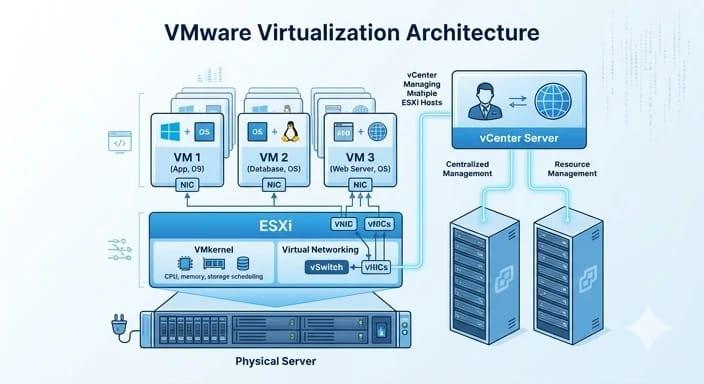
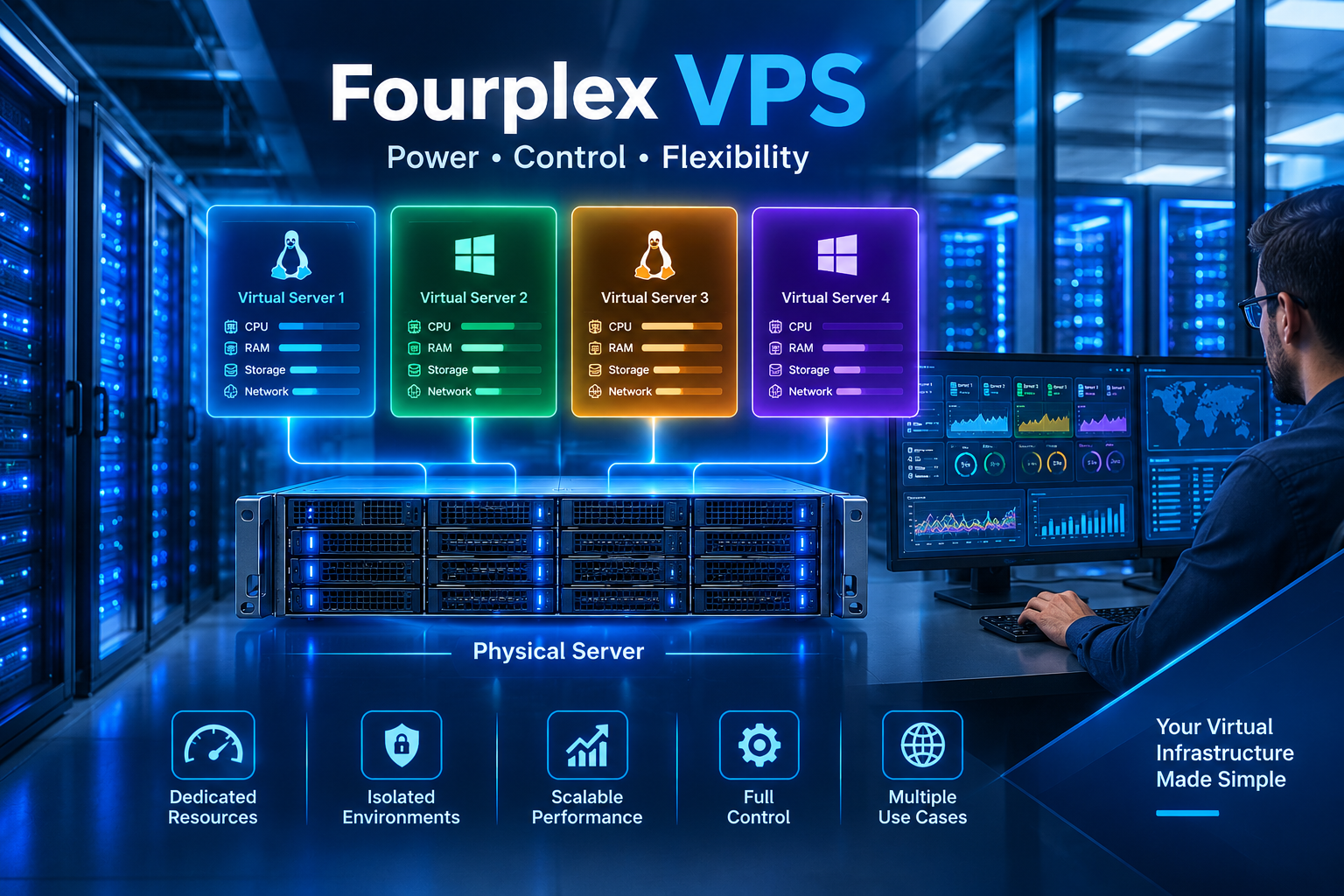
VMware virtualization technology enables the execution of multiple virtual machines or VMs using one highly efficient physical server. The virtual machine may almost act as an individual server and have its own operating system, applications, storage, CPU, and networking.
Whereas companies may benefit from the ability to have flexible, scalable, and effective resource management capabilities, VMware virtualization-based hosting might be an ideal solution. As opposed to running only one workload on one physical server, the organization can run multiple workloads on the same hardware using virtualization.
In this guide, we will cover what VMware Virtual Server Hosting is, how it works, its benefits, use cases, security, and ways of choosing an appropriate hosting provider.
What Is VMware Virtual Server Hosting?
VMware Virtual Server Hosting is a hosting environment where VMware virtualization technology is used to create and manage virtual servers on physical hardware.
A physical server contains resources such as:
- CPU
- RAM
- SSD or HDD storage
- Network connections
- Power and cooling systems
VMware’s virtualization layer allows these physical resources to be divided among multiple virtual machines.
Each VM can have its own:
- Operating system
- CPU allocation
- RAM allocation
- Storage
- IP configuration
- Applications
- Security settings
For instance, let us assume that there is a physical server which has 32 CPU cores and 128 GB of RAM capacity. Rather than dedicating the entire server to one application only, virtualization allows for multiple VMs to use the resources.
A certain VM can have a website, while other VMs can have a database as well as development.
The reason for VMware Virtual Server Hosting being useful for businesses is because of this.
How Does VMware Virtual Server Hosting Work?
To understand VMware hosting, it is important to understand the process of virtualization first.
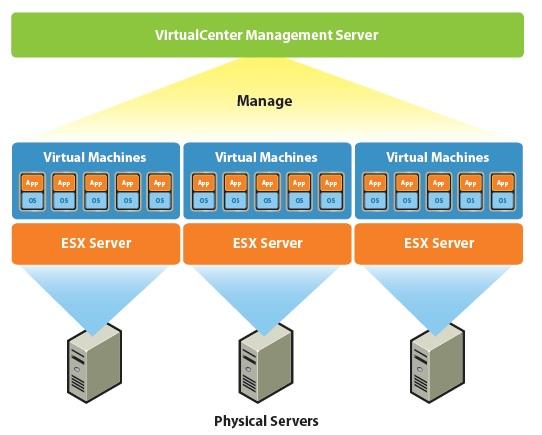
A hypervisor acts as an intermediary between the physical host and the virtual machine. For instance, VMware ESXi is a famous example of a hypervisor used in virtualization.
The general framework can be outlined as follows:
Physical Server → VMware Hypervisor → Virtual Machines → Applications
The physical server provides the hardware resources. The hypervisor manages those resources and distributes them to different virtual machines.
For example:
Physical Server
- 32 CPU cores
- 128 GB RAM
- 2 TB SSD storage
↓
VMware Hypervisor
↓
Virtual Machine 1
- Linux
- Web server
Virtual Machine 2
- Windows Server
- Business application
Virtual Machine 3
- Linux
- Database server
Each VM operates within its own environment.
This separation is one of the major advantages of virtualization. A problem inside one virtual machine does not necessarily mean that every other VM on the physical server will stop working.
Key Benefits of VMware Virtual Server Hosting
There are several reasons why businesses choose VMware Virtual Server Hosting.
1. Better Resource Utilization
Sometimes the physical servers may not be fully utilized.
For instance, a physical server may have 32 cores, but an application running on it may not make use of more than just a fraction of them.
Virtualization enables sharing of the hardware by multiple applications.
It increases the utilization of the hardware resources.
2. Scalability
Business needs can become different very fast.
More visitors may visit a website. More memory will be required for an application. Database size may get larger over time.
Virtual server allows to modify allocated resources depending on work load.
In some hosting environments you may be able to add:
- CPU
- RAM
- Storage
- Network capacity
This makes VMware Virtual Server Hosting useful for growing businesses.
3. Cost Efficiency
Running several physical servers can require significant investment.
You may need to pay for:
- Server hardware
- Data center space
- Electricity
- Cooling
- Network equipment
- Hardware maintenance
- Technical staff
Virtualization can reduce the amount of physical hardware required.
Instead of purchasing one physical server for every workload, multiple workloads can run on a shared virtualization infrastructure.
This can make infrastructure management more cost-effective.
4. Improved Isolation
Virtual machines are separated from each other at the virtualization layer.
For example, a company could use separate VMs for:
- Production
- Development
- Testing
- Database services
- Internal applications
This separation can make it easier to manage different environments.
It can also reduce the risk of configuration changes in one environment affecting another.
5. Easy Testing and Development
Test environments are needed for testing purposes by developers.
Setting up an actual server for each test environment is time-consuming and costly.
VMware virtualization allows developers to set up VMs for various operating systems and applications.
They can test:
- New software
- Operating system updates
- Website changes
- Database configurations
- Security settings
After testing is finished, the VM can be removed or reused.
VMware Virtual Server Hosting vs Traditional Hosting
Traditional hosting and VMware virtualization are not the same.
Traditional physical hosting generally provides a physical server dedicated to a particular workload.
VMware hosting uses virtualization to create virtual servers on physical hardware.
| Feature | VMware Virtual Server Hosting | Traditional Physical Hosting |
| Server Type | Virtual | Physical |
| Scalability | High | More limited |
| Resource Management | Flexible | Hardware-based |
| Isolation | Virtualized | Physical |
| Hardware Cost | Lower per workload | Higher |
| Testing | Easy | More difficult |
| Deployment | Usually faster | Can take longer |
| Management | Centralized tools available | Hardware-focused |
The right option depends on the workload, budget, performance requirements, and technical environment.
Common Uses of VMware Virtual Server Hosting
VMware Virtual Server Hosting can support many different types of workloads.
Website Hosting
Businesses can use virtual servers to host websites and web applications.
A VM can run software such as:
- Apache
- Nginx
- PHP
- MySQL
- WordPress
Virtualization makes it possible to separate different websites or applications into different environments.
Application Hosting
Companies often need servers for business applications.
Examples include:
- CRM systems
- ERP software
- Accounting applications
- Inventory systems
- Customer portals
A VMware virtual server can provide an isolated environment for these applications.
Database Hosting
Databases need consistent CPU, memory, and storage.
VMs can be allocated with required resources depending on database demands.
Some examples of database systems are:
- MySQL
- PostgreSQL
- Microsoft SQL Server
- MariaDB
For high-performance databases, proper storage and resource planning are important.
Development and Testing
Developers can create separate VMs for different projects.For example:
VM 1: Development
VM 2: Testing
VM 3: Staging
VM 4: Production
This separation makes it easier to test changes before deploying them to a live environment.
Backup and Disaster Recovery
The use of virtual machines may also prove helpful in backup and disaster recovery plans.
Organizations may make backup copies of the virtual machine and save them separately.
In case of any kind of large-scale problem, organizations will be able to recover the VM through its backup.
Virtualization in itself is not a total backup solution. Organizations will need to have proper backup plans in place.
VMware Virtual Server Hosting Security
Security should always be a major consideration when choosing a virtual server.
A virtual server should be protected using multiple security layers.
Firewall
A firewall can control incoming and outgoing network traffic.
Only required ports and services should be exposed to the internet.
Strong Authentication
Use strong passwords and, where available, multi-factor authentication.
Administrative access should be limited to authorized users.
Regular Updates
The operating system, applications, and virtualization management components should be updated according to the provider’s maintenance process.
Updates can address security vulnerabilities and improve reliability.
Backup Protection
Important information must be saved periodically.
Backups should preferably be kept away from the production site.
Testing of the backup is equally essential since a backup that cannot be recovered is not very useful in times of emergencies.
How to Choose a VMware Virtual Server Hosting Provider
Choosing a hosting provider requires more than looking at the monthly price.
Here are some important factors to consider.
1. Performance
Check the hardware specifications.
Look at:
- CPU type
- RAM
- SSD or NVMe storage
- Network speed
- Resource allocation
A low-cost server may not provide enough resources for demanding applications.
2. Reliability
Look for a provider with a strong infrastructure and clear uptime policies.
Ask about:
- Data center reliability
- Power redundancy
- Network redundancy
- Hardware replacement
- Monitoring
Reliable infrastructure is particularly important for business applications.
3. Technical Support
Good technical support can save time when something goes wrong.
Check whether support is available through:
- Ticket
- Live chat
- Phone
- Emergency support
Also check whether support is available 24/7 if your business requires continuous operation.
4. Backup Options
Ask what backup services are available.
Important questions include:
- How frequently are backups created?
- How long are backups retained?
- Where are backups stored?
- Can individual files be restored?
- Can an entire VM be restored?
Understanding the backup policy before an emergency occurs is important.
5. Data Center Location
The geographic placement of the data center has an impact on latency.
In case the majority of your cung
With managed hosting, the provider handles many technical responsibilities.
Depending on the service, this may include:
- Server monitoring
- Operating system management
- Security assistance
- Backup management
- Performance monitoring
- Technical support
Managed hosting can be useful for businesses without a large technical team.
Unmanaged VMware Hosting
With unmanaged hosting, you usually have more control over the server environment.
You may be responsible for:
- Operating system installation
- Updates
- Security
- Application configuration
- Monitoring
- Backups
This option can be suitable for experienced system administrators and developers who want greater control.
VMware Virtual Server Hosting for Small Businesses
Small businesses do not always need a large physical infrastructure.
A virtual server can provide a practical way to run important applications without purchasing multiple physical machines.
For example, a small company could use separate virtual machines for:
- Website
- Internal application
- Database
- Backup services
This can make infrastructure easier to organize.
As the company grows, the hosting environment can also be adjusted to meet new requirements.
VMware Virtual Server Hosting for Large Businesses
These can range from hundreds to thousands of applications.
Handling each application using different physical servers becomes quite difficult.
Virtualization technology can help in consolidation and management.
Large organizations may also combine virtualization with:
- High availability
- Load balancing
- Automated deployment
- Disaster recovery
- Centralized monitoring
- Private cloud infrastructure
This creates a more flexible infrastructure for complex business environments.
VMware Virtual Server Hosting and Cloud Computing
VMware virtualization and cloud computing are related, but they are not the same thing.
Virtualization creates virtual machines on physical hardware.
Cloud computing adds additional services and management capabilities around infrastructure.
A cloud environment may provide:
- On-demand resources
- Automated deployment
- Flexible scaling
- Self-service management
- Usage-based billing
VMware technologies can be used as part of private, public, or hybrid cloud environments.
Therefore, VMware Virtual Server Hosting can be an important building block for modern cloud infrastructure.
VMware Virtual Server Hosting Performance Tips
Getting good performance requires proper resource management.
Here are several practical tips.
Monitor CPU Usage
If CPU usage remains high for long periods, the VM may need additional resources or application optimization.
Monitor RAM
Insufficient memory can negatively affect application performance.
Use Fast Storage
SSD or NVMe storage can significantly improve workloads that perform many read and write operations.
Optimize Applications
Adding more server resources is not always the best solution. Poorly optimized software can remain slow even on powerful hardware.
Monitor Network Traffic
High network usage can affect applications that depend heavily on data transfer.
Is VMware Virtual Server Hosting Right for You?
VMware Virtual Server Hosting can be a strong option if you need flexible server infrastructure without managing a separate physical machine for every workload.
It may be suitable for:
- Small businesses
- Growing companies
- Developers
- IT teams
- Web agencies
- SaaS businesses
- Enterprise organizations
- Application developers
However, the best hosting solution depends on your specific requirements.
Before choosing a provider, consider your:
- Budget
- Application requirements
- CPU requirements
- RAM requirements
- Storage needs
- Security requirements
- Backup requirements
- Expected traffic
- Technical expertise
Frequently Asked Questions
What is VMware Virtual Server Hosting?
VMware Virtual Server Hosting is a hosting solution that uses VMware virtualization technology to create virtual servers on physical server hardware.
Is VMware hosting good for websites?
Yes. VMware virtual servers can host websites, web applications, databases, and other online services when properly configured.
Is VMware hosting scalable?
Yes. Virtual environments can often be adjusted by increasing resources such as CPU, RAM, and storage, depending on the hosting platform.
Is VMware better than a physical server?
Neither is automatically better. VMware offers flexibility and resource sharing, while a physical server can provide dedicated hardware resources. The right choice depends on the workload.
Is VMware Virtual Server Hosting secure?
It can be secure when properly configured. Security should include firewalls, access controls, updates, monitoring, backups, and other appropriate protections.
Can I use VMware hosting for business applications?
Yes. VMware virtual servers are commonly suitable for many business applications, provided the server has sufficient resources and the application supports the chosen environment.
Conclusion
VMware Virtual Server Hosting offers a means of application or service deployment via virtual servers rather than allocating a physical server for each task.
The strengths of VMware Hosting include improved utilization, scalability, flexibility, ease of testing, task segregation, and possible reduced infrastructure costs.
For smaller companies, VMware Hosting will give them access to professional-grade server hosting without the need for huge physical infrastructures. Meanwhile, virtualization may benefit larger enterprises by helping them consolidate their workloads and reduce management complexity.
But selecting the best hosting company for your VMware needs is vital. Performance, reliability, security, backup capability, technical support, data center location, and cost should all be considered first.
If your business needs a flexible server environment that can grow with your applications, VMware Virtual Server Hosting can be a practical technology to consider. If your customers are in Europe, for instance, then placing your data center in Europe will be better than placing the server elsewhere.

2 thoughts on “VMware Virtual Server Hosting: A Complete Guide for Businesses”