










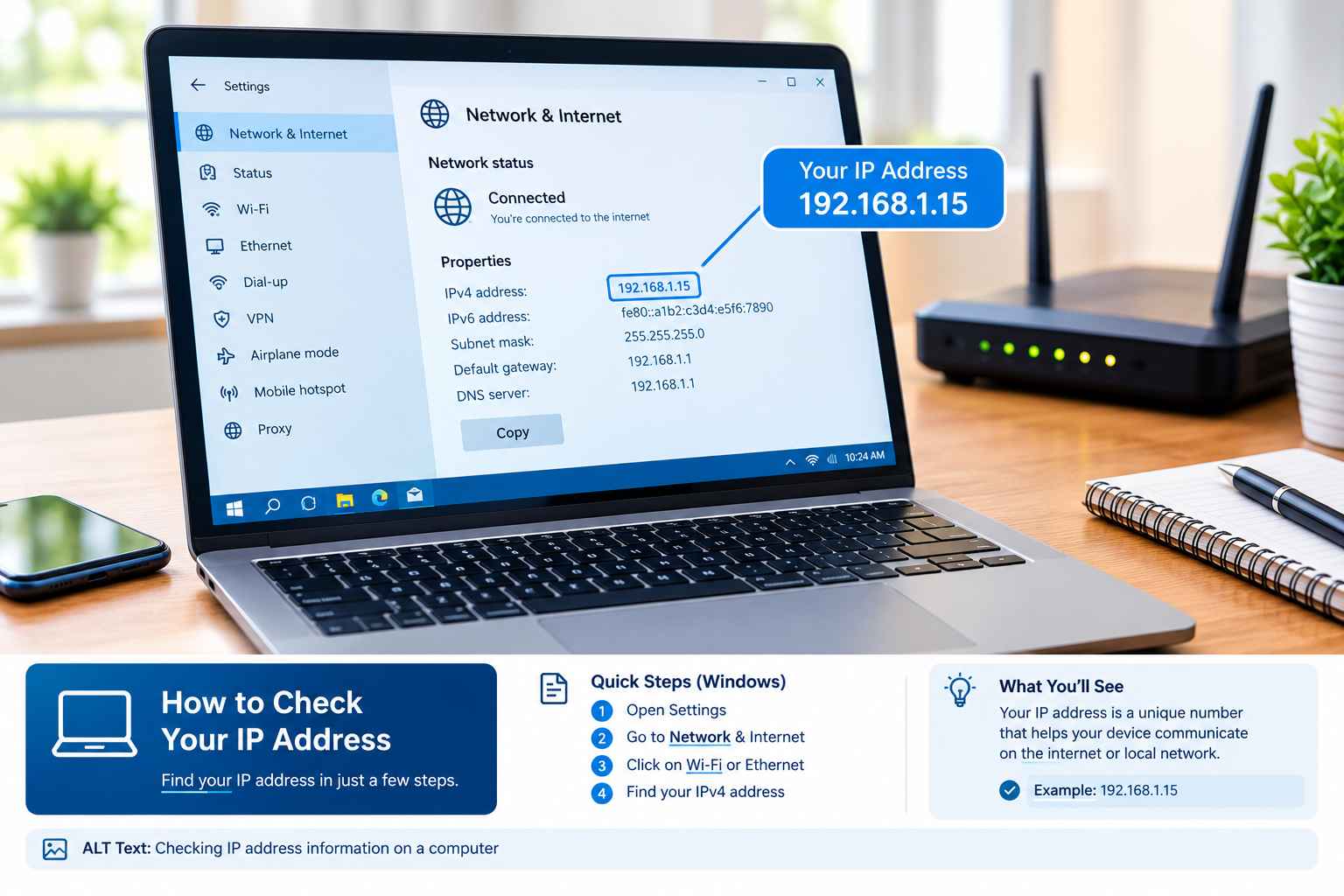
If you have ever wondered “is IP address” or what an IP address actually means, you are not alone. Every device connected to the internet or a local network uses an IP address. Computers, smartphones, servers, routers, smart TVs, gaming consoles, and many other connected devices rely on IP addresses to communicate.
The IP address can be compared to the identification address of a device in a network. An IP address is needed for transferring information from one device to another and helping networks identify where information should go.
Knowledge of IP address terminology may be helpful for website owners, students, network administrators, business owners, and average internet users. In this article, we are going to give you an explanation about the IP address, its functions, types of IP addresses such as IPv4, IPv6, public, private, static, and dynamic IP addresses, and importance of IP addresses.
What Is an IP Address?
An IP address, or Internet Protocol address, is a numerical or alphanumeric identifier assigned to a device connected to a network that uses the Internet Protocol.
In simple terms, an IP address tells a network where a particular device can be reached.
For example, an IPv4 address may look like this:
192.168.1.10
An IPv6 address can look like this:
2001:0db8:85a3:0000:0000:8a2e:0370:7334
This will depend on the version of Internet Protocol that is used.
Each time you access a website, send emails, view videos, or use online applications, there is communication on the network among various devices. This is where IP addresses come into play, as they enable these devices to know their network destinations.
So, when someone asks “is IP address?”, the simple answer is that an IP address is a network identifier used to help devices communicate.
Why Is an IP Address Important?
IP address is essential because today’s networks require an approach that can help identify the destination of any communication.
Think of a case where you have to ship something but do not indicate the address. The delivery agency will be unable to deliver your item. The same way applies to communication within a network.
The messages sent through a network are broken down into packets. The packets contain data about their destination.
An IP address helps identify both the sender and receiver of the message.
For example:
- Your computer has an IP address.
- Your router has an IP address.
- A web server has an IP address.
- Your smartphone can have an IP address.
- A gaming console can have an IP address.
- Other network-connected devices can also have IP addresses.
Without addressing systems such as IP addresses, communication across IP-based networks would not work in the way we expect.
How Does an IP Address Work?
Understanding the concept of an IP address becomes much clearer when one considers an ordinary internet connection.
Let us imagine that we type in the address of the website into our web browser. The computer should be able to establish communication with a web server in order to get the requested website.
There are a few network communication actions going onunderh the hood.
Firstly, the computer establishes the connection to the network using such technologies as Wi-Fi, Ethernet, or mobile connections. In this way, the computer gets the network configuration and its IP address.
When requesting information from the website, the network starts sending packets towards the server.
The server receives the request and sends information back to your device.
Your device then processes the returned data and displays the website in your browser.
The entire process can happen very quickly.
What Is an IPv4 Address?
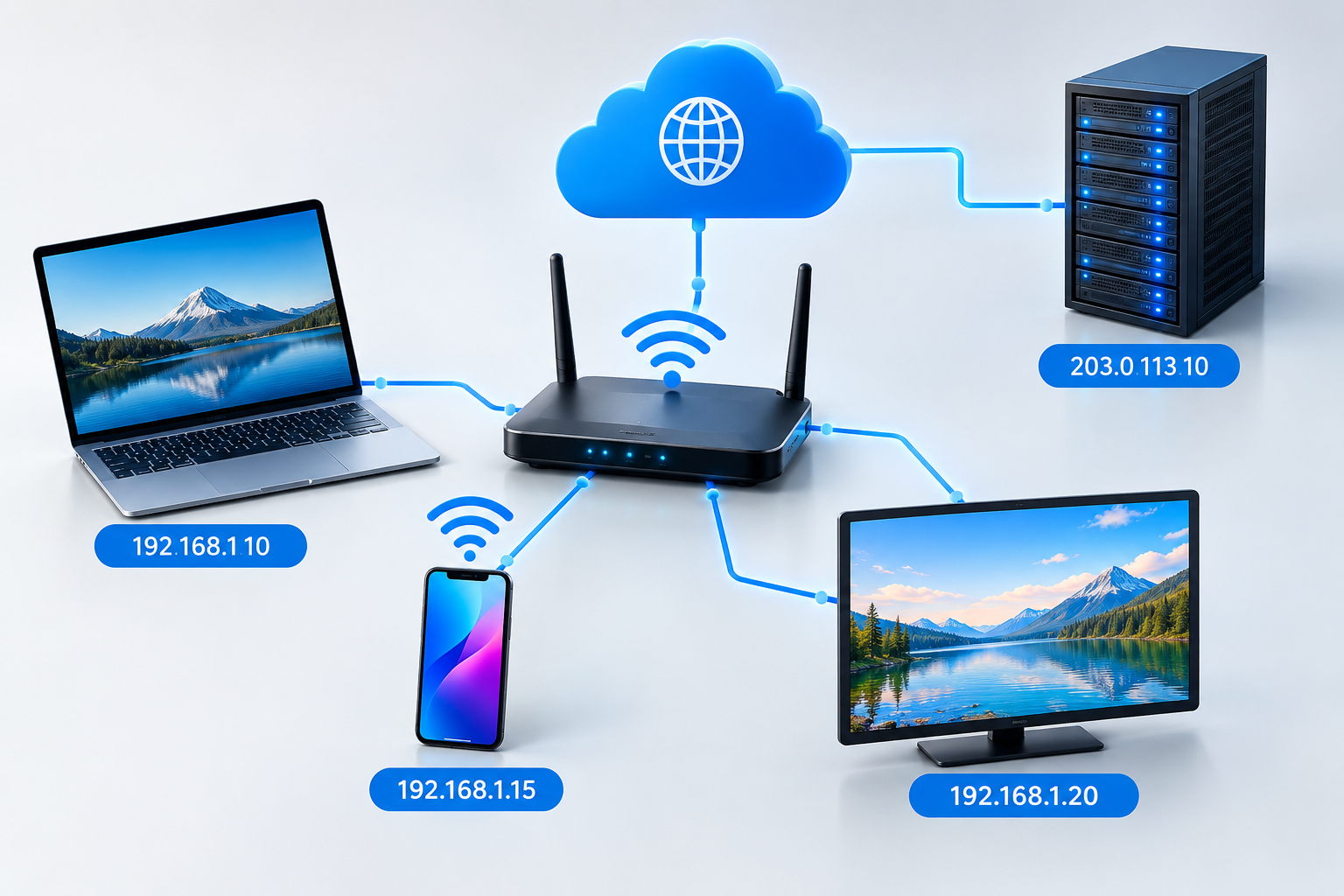
IPv4 stands for Internet Protocol version 4. It is one of the most widely used IP addressing systems.
IPv4 addresses use 32 bits and are normally written as four numbers separated by periods.
For example:
192.168.1.1
Each section can contain a value from 0 to 255.
Another example is:
8.8.8.8
An IPv4 address contains four groups called octets.
This is because the IPv4 system employs 32 bits and thus can offer around 4.3 billion different IP addresses. However, although 4.3 billion seems to be a very large number, there was a lot of pressure put on IPv4 addresses.
This is one reason IPv6 was developed.
What Is an IPv6 Address?
IPv6 stands for Internet Protocol version 6.
IPv6 uses 128-bit addresses, providing an enormously larger address space than IPv4.
An IPv6 address may look like:
2001:db8:85a3::8a2e:370:7334
IPv6 uses hexadecimal numbers separated by colons.
The much larger address space makes IPv6 suitable for the continued growth of internet-connected devices.
IPv6 also includes various improvements to network addressing and protocol design.
While IPv4 remains extremely common, IPv6 adoption continues to grow.
IPv4 vs IPv6
IPv4 and IPv6 both perform the basic job of network addressing, but their address formats are different.
| Feature | IPv4 | IPv6 |
| Address size | 32-bit | 128-bit |
| Format | Decimal | Hexadecimal |
| Example | 192.168.1.1 | 2001:db8::1 |
| Address capacity | About 4.3 billion | Extremely large |
| Separator | Periods | Colons |
| Development | Older standard | Newer standard |
The biggest difference is the size of the address space.
IPv6 was designed to provide enough addresses for the enormous number of devices connecting to modern networks.
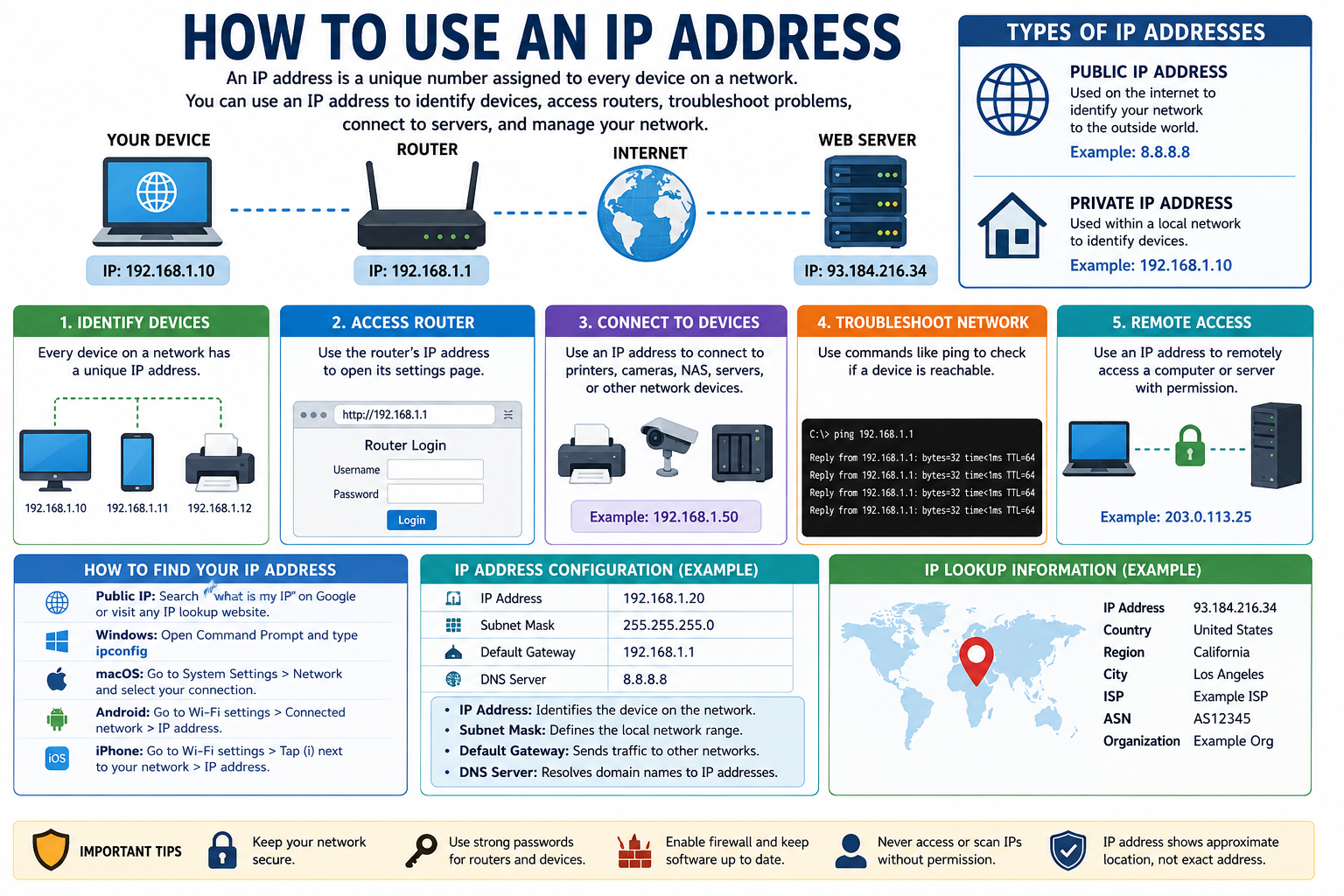
What Is a Public IP Address?
A public IP address is an address that can be used to identify a network or device relative to the internet as a whole.
Your ISP will allocate a public IP address to your home or business connection.
As you access various internet-based services, those services will be able to know what public IP address is used by your connection.
Public IP addresses are used when communicating on the internet.
For instance, your website server will require an IP address that can be accessed on the internet.
Public IP addresses are thus very relevant for websites, servers, hosting services, business networks, etc.
What Is a Private IP Address?
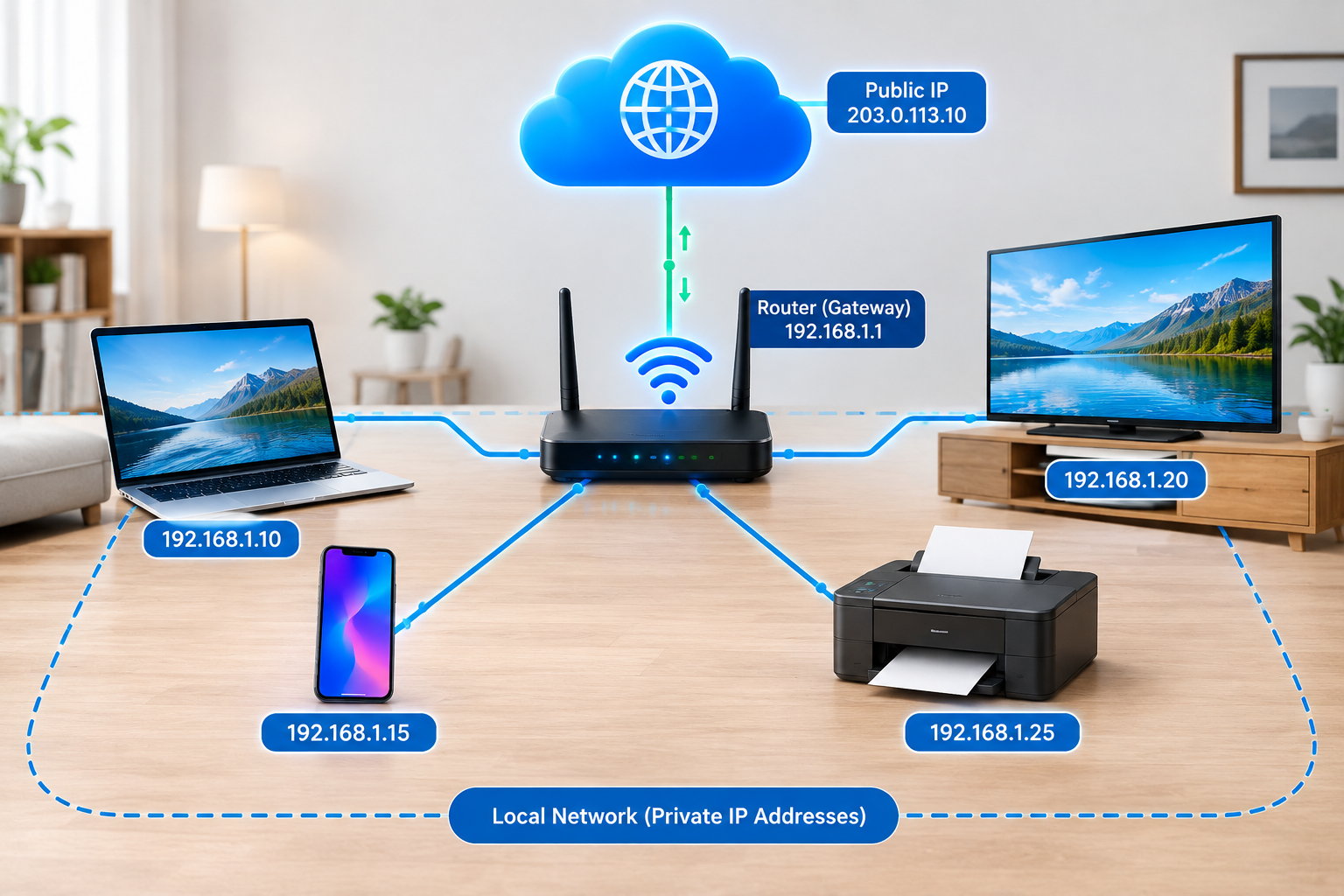
A private IP address is used within a local network.
For example, a home router might use a private network such as:
192.168.1.0/24
Devices connected to the router may receive addresses such as:
- 192.168.1.2
- 192.168.1.3
- 192.168.1.4
- 192.168.1.5
These addresses are generally not directly routable across the public internet.
Private IP addresses allow multiple devices inside a local network to communicate with each other.
Your laptop, phone, printer, smart TV, and other devices can all have private IP addresses while sharing the same internet connection.
Public IP vs Private IP
The difference between public and private IP addresses is important.
A public IP address is associated with internet-facing communication.
A private IP address is normally used inside a local network.
For example, your home router may have a public IP address assigned by your ISP while your laptop receives a private IP address from the router.
This arrangement allows multiple devices to access the internet through a shared connection.
What Is a Static IP Address?
A static IP address is an IP address that is intended to remain the same.
Static IP addresses can be useful when a device or service needs a consistent address.
For example, businesses may use static IP addresses for:
- Web servers
- Email servers
- Remote access systems
- VPN servers
- Business applications
- Hosting environments
- Network equipment
A consistent IP address makes it easier to configure services that need a predictable network destination.
However, not every internet user needs a static IP address.
What Is a Dynamic IP Address?
The IP address of a device can change dynamically.
There are many residential internet connections that have dynamically assigned IP addresses.
The address is allocated by means of network configuration methods like DHCP.
Dynamic IP allocation helps providers manage their IP addresses in an efficient manner.
In cases of typical usage like browsing the web, streaming, social media, and emails one does not need to manage their IP address.
What Is a Local IP Address?
A local IP address is an address used within a local network.
For example, your router may assign your computer an address such as:
192.168.1.20
Your phone could receive:
192.168.1.21
And another device might receive:
192.168.1.22
These addresses allow devices within the same network to communicate.
Local IP addresses are especially useful when troubleshooting network problems.
If your computer cannot connect to another device on your home network, checking its local IP configuration can help identify the problem.
What Is a Loopback IP Address?
A loopback IP address allows a device to communicate with itself.
For IPv4, the most commonly recognized loopback address is:
127.0.0.1
This address is often associated with the term localhost.
Developers commonly use localhost when testing websites, applications, databases, and network services on their own computers.
For example, a developer might run a website locally and access it through:
or:
The traffic stays on the local machine rather than traveling to a public web server.
What Is an IP Address Used For?
An IP address can serve several important networking purposes.
1. Device Identification
IP addresses help identify network endpoints.
2. Network Communication
Devices use IP addressing to communicate across networks.
3. Data Routing
Routers use network addressing information to determine where packets should be forwarded.
4. Server Access
Websites and online services rely on IP addresses for network communication.
5. Network Troubleshooting
Technicians can use IP information to diagnose connectivity and configuration problems.
6. Network Management
Businesses and organizations use IP addressing to manage devices and network resources.
Can a Website Have an IP Address?
Yes. Websites exist on web servers, which have IP addresses.
As users type domain names in their browsers, the domain names are usually converted to IP addresses via the Domain Name System, which is often referred to as DNS.
In other words, users do not need to remember the numerical addresses but can use domain names like:
example.com
DNS helps find the IP address associated with that domain.
Your browser can then communicate with the appropriate server.
This system makes the internet much easier for humans to use.
What Is DNS and How Does It Relate to IP Addresses?
DNS stands for Domain Name System.
DNS translates human-readable domain names into IP addresses.
People generally find domain names easier to remember than numerical addresses.
For example:
example.com
is easier to remember than:
93.184.216.34
When you request a domain, your device may perform DNS lookups to determine which IP address should receive the request.
DNS is therefore closely connected to IP addressing.
Can an IP Address Change?
Yes, an IP address can change.
Whether it changes depends on the type of address and how the network is configured.
Dynamic public IP addresses can change when an ISP assigns a different address.
Private IP addresses can also change when a router assigns a new address to a device.
Static addresses are designed to remain consistent unless they are deliberately changed.
For this reason, you should not assume that an IP address will always remain the same.
How Can You Find Your IP Address?
There are several ways to find an IP address.
Finding Your Public IP Address
You can search online for an IP address checking service. Many websites display the public IP address detected from your internet connection.
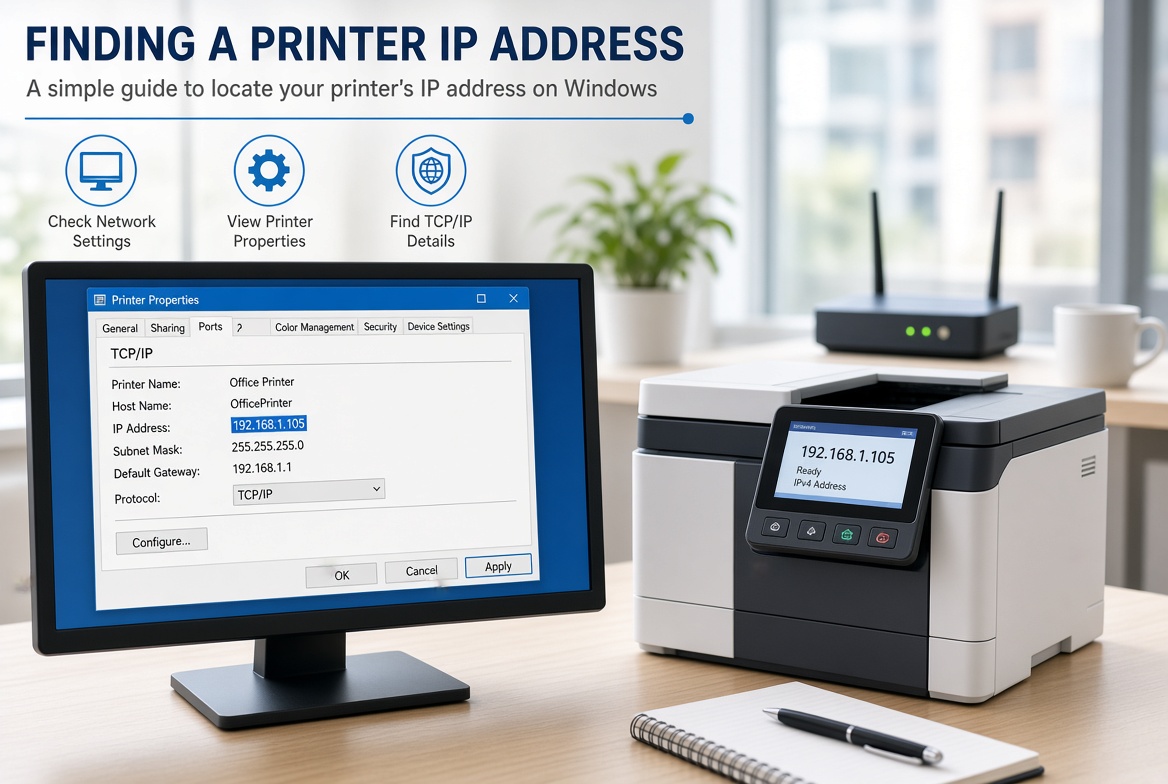
Finding Your Private IP Address on Windows
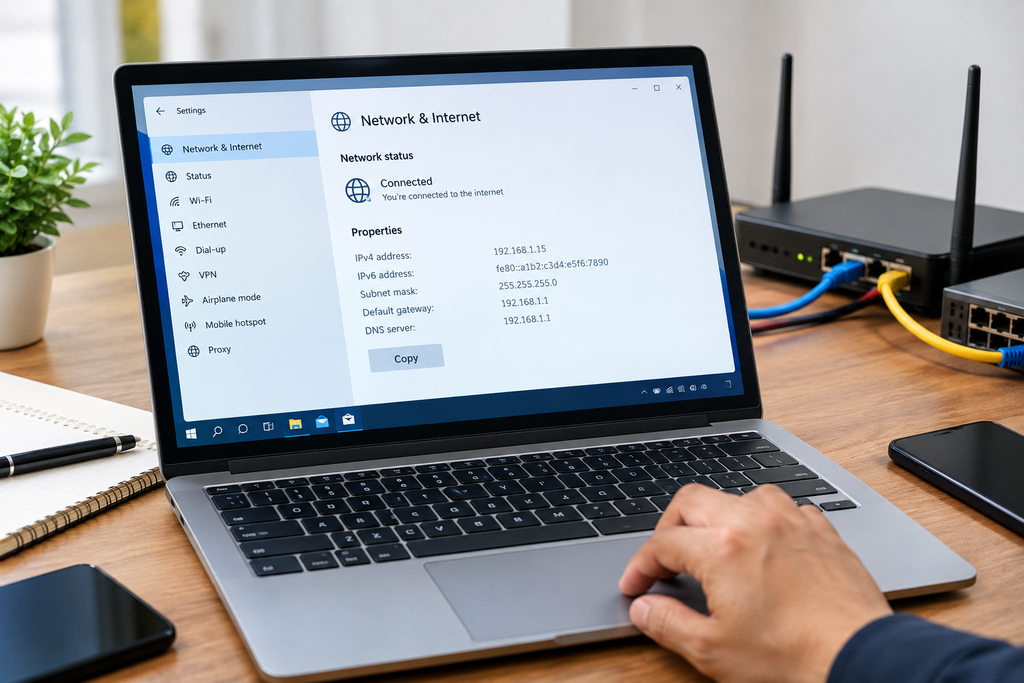
On Windows, you can open Command Prompt and type:
ipconfig
Look for the network adapter you are currently using.
You may see an IPv4 address such as:
192.168.1.10
Finding Your IP Address on Other Devices
Android, iPhone, macOS, Linux, and other operating systems provide network settings where you can view IP configuration.
The exact steps depend on the operating system and device.
Is an IP Address the Same as a MAC Address?
No.
An IP address and a MAC address are different types of network identifiers.
An IP address operates at the network layer and is used for IP-based communication.
A MAC address is associated with a network interface and is commonly used for communication within a local network.
For example, an IPv4 address might look like:
192.168.1.25
A MAC address may look like:
00:1A:2B:3C:4D:5E
They serve different purposes even though both are involved in networking.
Is an IP Address Private Information?
The IP address may contain data regarding the network connection, but one cannot equate it to a definite physical location.
The IP address may belong to an Internet Service Provider, a corporation, a hosting facility, or even just a network.
The database for the geolocation of IP addresses may indicate a particular geographic location, but the IP-based location is not always accurate.
For instance, an IP address may belong to a city or state but not give the exact location of the user’s home.
Does an IP Address Reveal Your Exact Location?
Generally, an IP address does not reliably reveal an exact physical location.
IP geolocation services can estimate geographic information, but accuracy varies.
Depending on the IP address and database, the estimated location may correspond to:
- A city
- A region
- An ISP
- A data center
- A business
- A general service area
VPNs, mobile networks, corporate networks, proxies, and other technologies can further affect the apparent location.
Therefore, an IP address should not be treated as a precise GPS coordinate.
What Is an IP Address Lookup?
An IP address lookup is a process of checking information associated with an IP address.
Depending on the lookup service, information may include:
- IP version
- ISP or network provider
- Autonomous System Number
- Organization
- Approximate geographic region
- Hostname
- Network information
IP lookup tools can be useful for troubleshooting, security analysis, website administration, and network research.
However, the information provided by different databases can vary.
Are IP Addresses Important for SEO?
IP addresses are relevant to websites and hosting, but an IP address alone does not determine search engine rankings.
Website owners may encounter IP-related SEO considerations involving:
- Website hosting
- Server availability
- DNS configuration
- Website accessibility
- Server performance
- SSL configuration
- CDN services
- Shared hosting environments
For example, if a website has serious server connectivity problems, users and search engine crawlers may have difficulty accessing it.
However, SEO involves many other factors, including content quality, technical accessibility, links, user experience, and search engine guidelines.
IP Addresses and Website Security
The IP address is also applicable for the purposes of cybersecurity.
Administrators can trace the IP address for such purposes as finding out unusual behavior within the network, configuring a firewall, restricting access, or investigating unusual traffic.
So, for instance, a firewall could accept traffic coming from some trusted network addresses and reject the rest of the traffic.
Systems for security can also take into account information about the reputation of an IP address when checking a network request.
However, the IP address in itself is not the proof that the particular person carried out the action.
What Is NAT?
NAT stands for Network Address Translation.
NAT allows devices using private IP addresses to communicate with external networks through a public IP address.
A typical home network may contain many devices using private addresses such as:
- 192.168.1.10
- 192.168.1.11
- 192.168.1.12
The router can translate their traffic so that they communicate with the internet using the network’s public IP address.
NAT has become an important part of IPv4 network deployment because the number of available IPv4 addresses is limited.
Why Are There Different Types of IP Addresses?
Different IP address types exist because networks have different requirements.
For example:
- Public addresses support internet communication.
- Private addresses support local networks.
- Static addresses provide consistency.
- Dynamic addresses allow flexible assignment.
- IPv4 provides traditional IP addressing.
- IPv6 provides a much larger address space.
- Loopback addresses support communication within a device.
Understanding these categories makes network configuration much easier.
Common IP Address Examples
Here are several examples you may encounter:
IPv4 public-style example:
8.8.8.8
Private IPv4 example:
192.168.1.1
Loopback IPv4:
127.0.0.1
IPv6 example:
2001:db8::1
The exact meaning of an address depends on the addressing system and network configuration.
Common Problems Related to IP Addresses
IP configuration problems can cause many types of connectivity issues.
Some common problems include:
Wrong IP Configuration
A device may have incorrect network settings.
IP Address Conflict
Two devices may accidentally be assigned the same address on a local network.
DHCP Problems
A device may fail to receive an appropriate IP configuration from the network.
DNS Problems
The device may have network connectivity but fail to resolve domain names.
Router Problems
A router may have configuration or connectivity issues.
ISP Problems
The internet service provider may experience an outage or routing problem.
Understanding IP addresses can help users and technicians troubleshoot these situations more effectively.
Frequently Asked Questions About IP Addresses
What is an IP address in simple words?
An IP address is a network identifier that helps devices communicate with each other over an IP-based network.
Is an IP address unique?
IP addresses can be used to identify the device or network interface in a specific network environment; however, IP addresses may also be reused or shared across multiple networks. Public and private addressing also function differently.
Is 192.168.1.1 a public IP address?
No. 192.168.1.1 belongs to a private IPv4 address range commonly used by local networks.
What is 127.0.0.1?
127.0.0.1 is the commonly used IPv4 loopback address. It refers back to the local computer.
Can an IP address change?
Yes. Dynamic IP addresses can change depending on how the network or ISP assigns them.
What is IPv6?
IPv6 is the newer version of the Internet Protocol that uses 128-bit addresses and provides a much larger address space than IPv4.
Does every device have an IP address?
Devices communicating over an IP network generally use an IP address, although the exact configuration depends on the network and device.
Can an IP address identify a person?
An IP address can be associated with a network connection, but it does not automatically identify a specific individual. Multiple users may share the same public IP address.
Final Thoughts
If you were searching “is IP address”, the key concept to remember is simple: an IP address is a network identifier that helps devices communicate across IP-based networks.
IP addresses can be of various types, such as IPv4, IPv6, public IP addresses, private IP addresses, and static or dynamic IP addresses. They are used extensively in everything ranging from Wi-Fi at home to huge data centers and websites around the world.
A basic knowledge of IP addresses will help you troubleshoot your internet, manage your website and server, understand DNS, network configurations, and the internet.
It is extremely important to learn the basics of IP addressing whether you are a beginner or someone who works with websites and servers.
One thought on “Is an IP Address? A Complete Guide to Understanding IP Addresses”