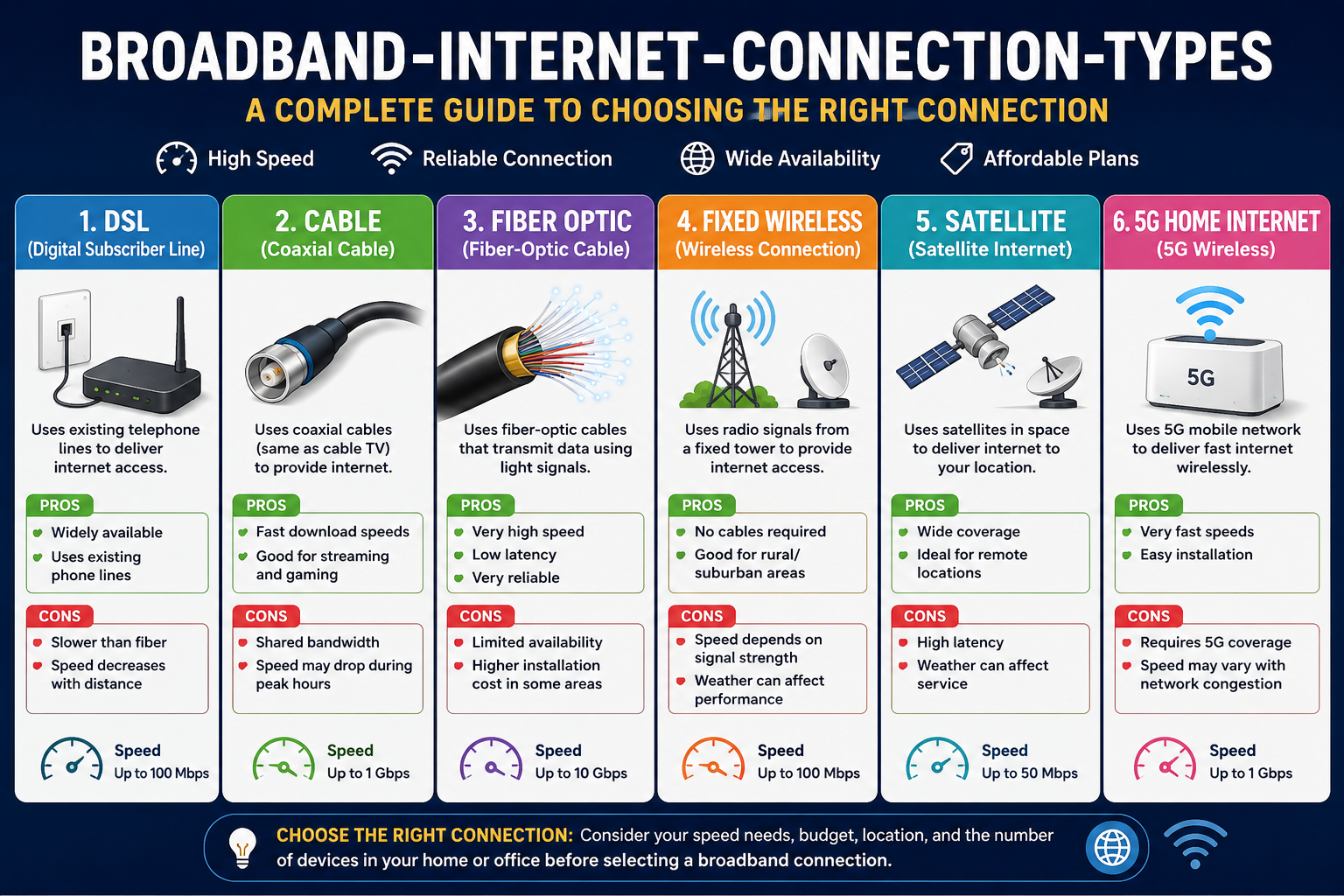
Choosing the right internet service starts with understanding the different broadband internet connection types available to you. Whether you are building a new home network, changing providers, or just trying to understand why your network seems slow, understanding how each one functions can save you time and money.
Introduction
Broadband Internet is a continuous high-speed internet connection. This type of internet connection is faster than the previous one called dial-up. As compared to broadband, dial-up uses normal telephone lines for transmission and blocks the line when in use. Broadband provides continuous data flow at greater speed.
Understanding broadband internet connection types. It is important to understand why not all of the technologies perform equally well. Speed, reliability, availability, and price are all very different for each technology – an internet connection that works great in one area may not be available at all just a few miles away. In this tutorial, we will discuss the main broadband choices, from DSL to 5G home internet connections.
What Is a Broadband Internet Connection?
The broadband internet connection operates by sending data using various frequency ranges, thus making it possible for data transfer to occur on many more channels than the dial-up connection does. This explains how the broadband connection can support video calling and 4K streaming,, among other uses.
Two numbers matter most when evaluating internet bandwidth: download speed (how fast data comes to your device) and upload speed (how fast data leaves your device, important for video calls and file sharing). A third factor, internet latency, measures the delay between sending a request and getting a response — critical for gaming and real-time communication. Broadband connections are used everywhere from homes and offices to schools, hospitals, and public institutions that depend on a stable, always-on connection.
What Are the Main Broadband Internet Connection Types?
There are several major broadband internet connection types, each with its own strengths depending on infrastructure and location.
| Connection Type | Typical Strength | Best For |
| DSL | Widely available | Basic home use |
| Cable | Fast download speeds | Streaming & gaming |
| Fiber | Very high speed | Heavy internet users |
| Fixed Wireless | No wired line needed | Rural/suburban areas |
| Satellite | Wide coverage | Remote locations |
| 5G Home Internet | Wireless & fast | Flexible home internet |
1. DSL Broadband Internet
The DSL (Digital Subscriber Line) internet provides access to broadband services via the telephone lines. DSL operates concurrently with the traditional phone service without affecting calls by making use of the unused frequencies. The popular types of DSL include ADSL, which emphasizes downloading, and VDSL, a fast form of DSL designed for shorter distances from the main equipment of the ISP. DSL internet connection speed largely relies on the distance from the central office of the ISP and it is slower compared to cable and fiber internet connections.
Advantages of DSL
- Uses existing telephone line internet infrastructure
- Available in many areas, including some rural regions
- Offers a dedicated (not shared) connection
- Sufficient for general browsing and everyday tasks
Disadvantages of DSL
- Speed decreases the farther you are from the provider’s hub
- Slower overall than fiber internet
- Upload speed is usually limited
2. Cable Broadband Internet
In cable internet, the same coaxial cabling system that is used to deliver cable TV services is used. This type of connection is much faster than DSL and is readily available in urban and suburban areas where cable TV service exists. Since cable internet is usually shared by several neighbors over the same line, speed varies depending on the number of people online.
Advantages of Cable Internet
- Fast download speeds
- Well suited to streaming
- Handles online gaming smoothly
- Generally faster than DSL internet
Disadvantages of Cable Internet
- Network congestion can occur during peak hours
- Speeds may dip when many users share the line
- Availability depends on local cable infrastructure
Among all broadband internet connection types, cable remains one of the most common choices for households that want strong download performance without the higher cost of fiber.
3. Fiber-Optic Broadband Internet
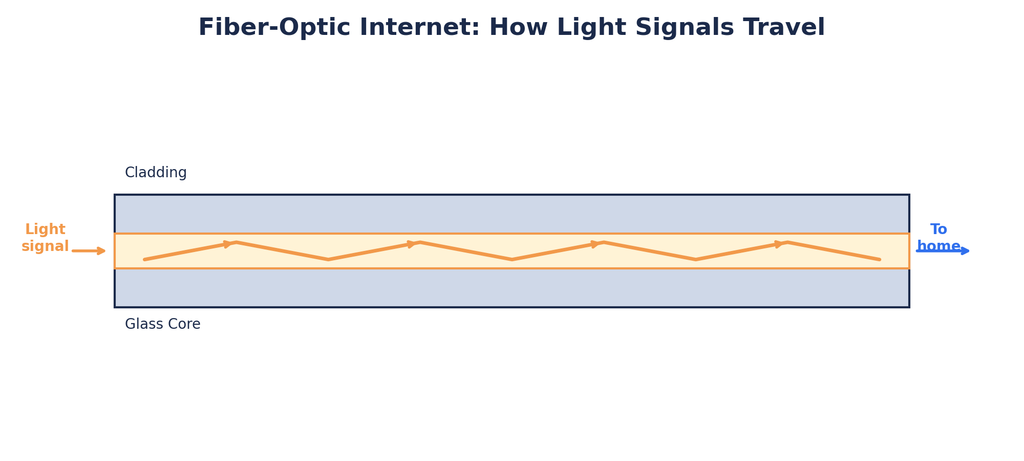
Fiber internet is widely regarded as the top-performing option among common broadband internet connection types. Instead of electrical signals over copper wire, fiber-optic cables transmit light signals, enabling very high speeds with minimal signal loss over distance. Fiber typically offers symmetrical or near-symmetrical upload and download speeds along with very low latency — a major advantage for gaming, video conferencing, and cloud-based work.
Types of Fiber Internet
- FTTH (Fiber to the Home): Fiber runs directly into the home.
- FTTP (Fiber to the Premises): Fiber reaches the property line or building.
- FTTC (Fiber to the Cabinet): Fiber reaches a nearby cabinet, then switches to another technology (like copper) for the final stretch.
Advantages of Fiber Internet
- Very high speed, often described as gigabit internet
- Fast upload speeds, not just download
- Low latency internet performance
- Reliable, stable connection
- Handles multiple devices without slowing down
Disadvantages
- Not available in all areas yet
- Installation costs can be higher
- Requires dedicated fiber-optic infrastructure
4. Fixed Wireless Broadband
Fixed wireless broadband makes use of radio waves to provide broadband Internet access, as opposed to using wires for connectivity. The receiver or antenna set up at the residence or building receives the Internet access signal from a tower close by.
Advantages
- Requires little to no cable installation
- Especially useful for rural broadband access
- Can be installed relatively quickly
Disadvantages
- Often requires a clear line-of-sight to the transmitter
- Weather and environmental conditions can affect signal
- Performance may decline with distance from the tower
5. Satellite Broadband Internet
How satellite internet works is through the communication of signals transmitted between the dish antenna located at your site and a satellite floating around in space. Since satellite internet does not use any cables or wires from the site, satellite broadband internet can go where no other internet technology can.
Advantages
- Available in remote and rural areas
- Doesn’t require existing telephone or cable infrastructure
- Offers extremely wide geographic coverage
Disadvantages
- Higher latency than wired options
- Weather can interfere with the signal
- Data limits and equipment costs may apply
6. 5G Home Internet
The 5G home internet service works through a mobile network, providing broadband access to a fixed router in your house. The 5G home internet can be described as a SIM-based internet service and is used as an alternative to fiber for those areas where wired access is unavailable.
Advantages
- Wireless setup with minimal cabling
- Generally easy and fast installation
- High speeds in well-covered areas
- Some plans offer portability
Disadvantages
- Performance depends heavily on local coverage
- Signal strength can vary by location
- Subject to network congestion
- Availability differs by region
Among newer broadband internet connection types, 5G home internet stands out for combining flexibility with competitive speeds.
7. Mobile Broadband
This is achieved using 4G or 5G cellular networks via smartphones or mobile hotspots. Mobile broadband is valued due to its mobility, meaning that it can be used at any place.
4G vs 5G Broadband
| Feature | 4G | 5G |
| Speed | Good | Faster |
| Latency | Moderate | Lower |
| Coverage | Wider | Growing |
| Use | Everyday internet | High-speed applications |
Broadband Internet Connection Types Comparison
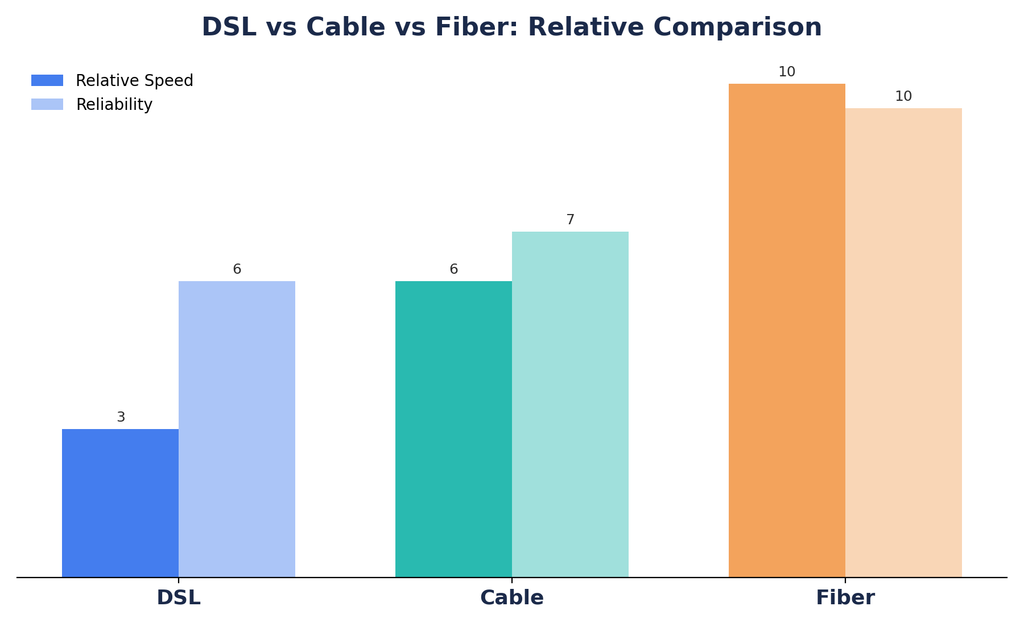
Here’s a side-by-side look at how the major broadband internet connection types compare:
| Type | Speed | Reliability | Latency | Availability | Best For |
| DSL | Moderate | Good | Moderate | High in some areas | Basic browsing |
| Cable | Fast | Good | Moderate | Common in serviced areas | Streaming |
| Fiber | Very fast | Excellent | Very low | Location dependent | Heavy users |
| Fixed Wireless | Moderate–Fast | Good | Moderate | Rural/suburban | Homes without wired service |
| Satellite | Moderate | Variable | High | Very wide | Remote areas |
| 5G | Fast | Good | Low–Moderate | Coverage dependent | Wireless home use |
How to Choose the Right Broadband Connection
Consider Your Internet Speed Needs
- Basic browsing → lower speed is fine
- HD streaming → moderate to high speed
- 4K streaming → higher speed needed
- Gaming → speed plus low latency
- Work from home → reliable upload and download
- Large file transfers → higher upload/download capacity
Check Local Availability
Not every connection type is offered in every location — always confirm what’s actually available at your address before comparing plans.
Compare Monthly Cost
Factor in the monthly fee, installation fee, equipment rental, and any data limits attached to the plan.
Consider Reliability
Raw speed isn’t everything; a stable connection that doesn’t drop matters just as much for daily use.
Check Upload Speed
This is especially important for video conferencing, cloud backups, content creation, and remote work.
Broadband Internet Speed: How Much Do You Need?
| Activity | Suggested Speed |
| Web browsing | 10–25 Mbps |
| HD streaming | 25 Mbps+ |
| Multiple HD streams | 50–100 Mbps+ |
| 4K streaming | 50 Mbps+ |
| Online gaming | Speed + low latency |
| Remote work | 25–100 Mbps+ |
| Large file uploads | Higher upload speed |
These are general guidelines — your actual requirement depends on the number of connected devices, network congestion, and the specific applications you use.
Broadband vs Wi-Fi: What’s the Difference?
Broadband is the internet itself, meaning the internet service provided by your internet provider to connect to the internet. Wi-Fi is a wireless system used by your router to transfer internet access to your device.
For example: Fiber broadband → Router → Wi-Fi → Smartphone/Laptop.
It’s worth noting that Wi-Fi speed and your broadband plan’s advertised speed aren’t the same thing — a weak Wi-Fi signal can make a fast broadband connection feel slow.
Wired vs Wireless Broadband Connections
Wired options include fiber, cable, and DSL. Wireless options include fixed wireless, satellite, and 4G/5G.
| Feature | Wired | Wireless |
| Stability | Usually high | Can vary |
| Installation | May require cables | Easier in some cases |
| Mobility | Low | Higher |
| Availability | Infrastructure dependent | Can reach some remote areas |
Deciding between wired and wireless broadband internet connection types often comes down to what infrastructure already exists at your address.
Advantages of Having a Broadband Internet Connection
An effective broadband connection enables fast browsing, smooth streaming of HD/4K videos, clear video calls, responsive gaming, telecommuting, cloud computing, intelligent home devices, and many devices being connected at once without the limitations of older technology.
Common Broadband Internet Problems and Solutions
Problem 1: Slow Internet. Possible causes include network congestion, weak Wi-Fi coverage, an outdated router, or an issue on the provider’s end.
Problem 2: High Latency.y Often caused by network distance, congestion, or wireless interference.
Problem 3: Connection Drops.s Usually linked to router issues, signal problems, or an ISP outage.
Problem 4: Slow Wi-Fi but Fast Broadband. This typically comes down to router placement, interference from other wireless devices, or limitations of the connected device itself rather than the broadband plan.
Frequently Asked Questions About Broadband Internet Connection Types
What are the main types of broadband internet? DSL, cable, fiber, fixed wireless, satellite, and mobile/5G broadband are the most common categories.
Which broadband connection is fastest? Fiber generally offers the highest speeds among common fixed broadband technologies, though actual speeds depend on the provider and plan.
Is fiber better than cable internet? Fiber typically wins on upload speed, latency, and reliability, while cable can still offer strong download speeds at a lower cost in many areas.
Is satellite internet good for rural areas? Yes — it can be a strong option where wired broadband isn’t available, though it comes with higher latency and specific service-plan considerations.
What broadband is best for gaming? Low latency, a stable connection, and sufficient download/upload speed matter more than raw top speed alone.
What broadband is best for work from home? Reliable broadband with sufficient download and upload speeds is important, and fiber is often a strong choice where it’s available.
What is the difference between DSL and fiber? DSL runs over copper telephone infrastructure, while fiber uses fiber-optic cables that transmit data as light, resulting in much higher speeds and lower latency.
Does broadband include Wi-Fi? No — broadband is the internet service itself, while Wi-Fi is the wireless network your router creates to share that connection with your devices.
Final Thoughts
Each of the broadband internet connection types covered here —The six options – fiber, cable, DSL, fixed wireless, satellite, and 5G – all have their own equation when it comes to speed, reliability, and accessibility. Fiber Internet is best for those who want a fast connection and are heavy Internet users, while cable is ideal for streaming and overall heavy usage. DSL can be considered the alternative when neither fiber nor cable is accessible. The other options are as follows: fixed wireless for rural/suburban households,
satellite for extremely remote locations, and 5G home internet where there is good coverage.