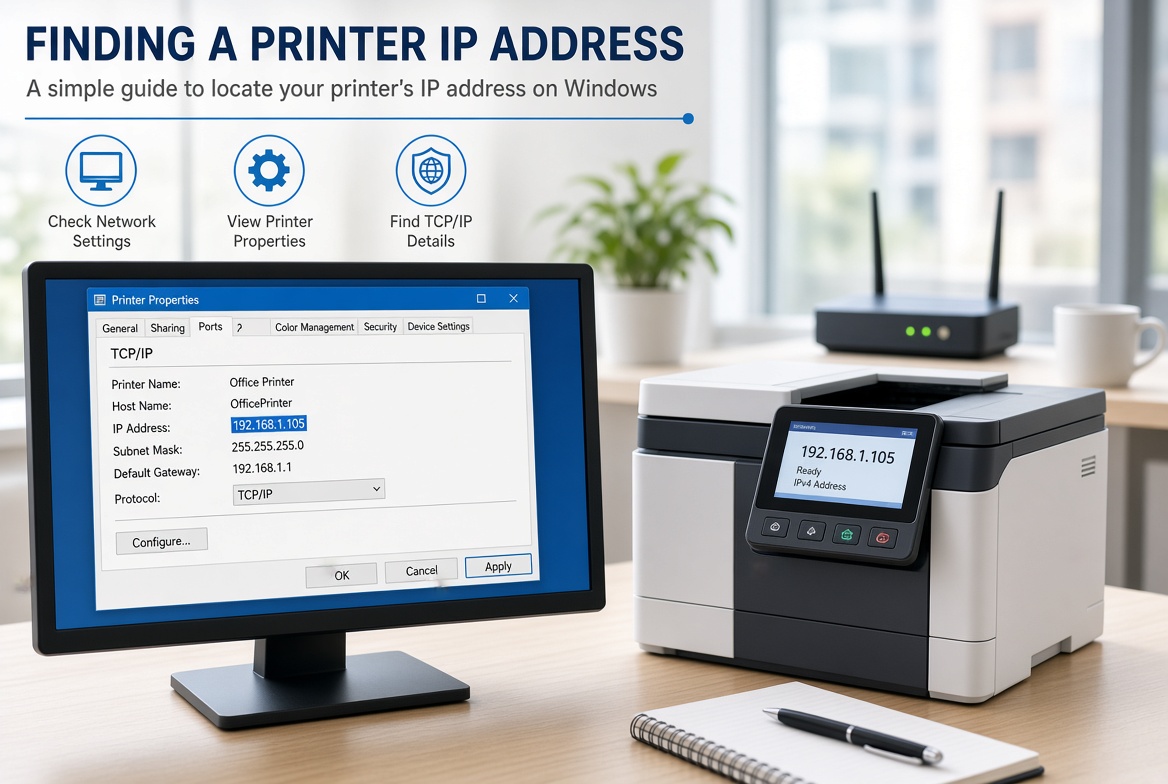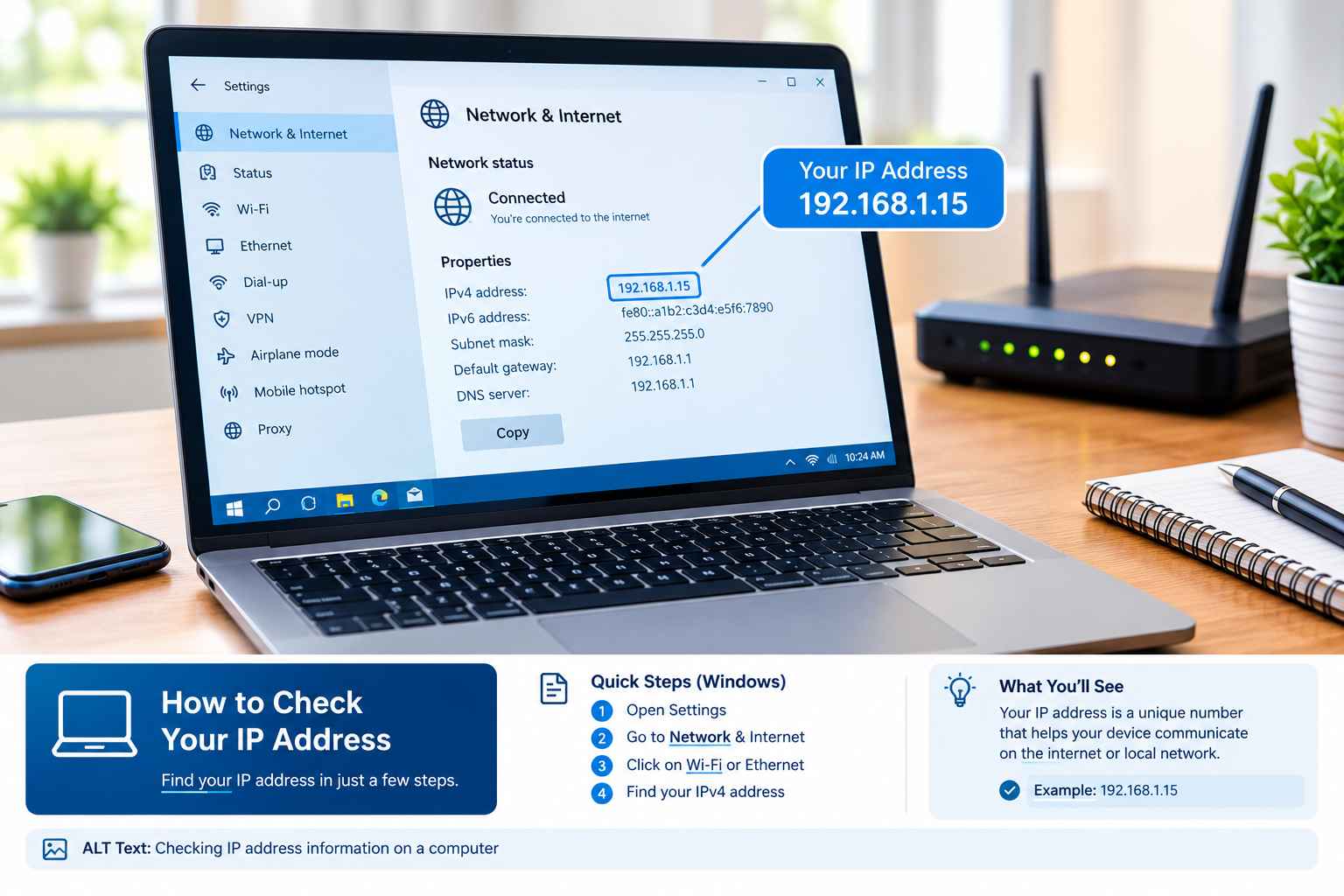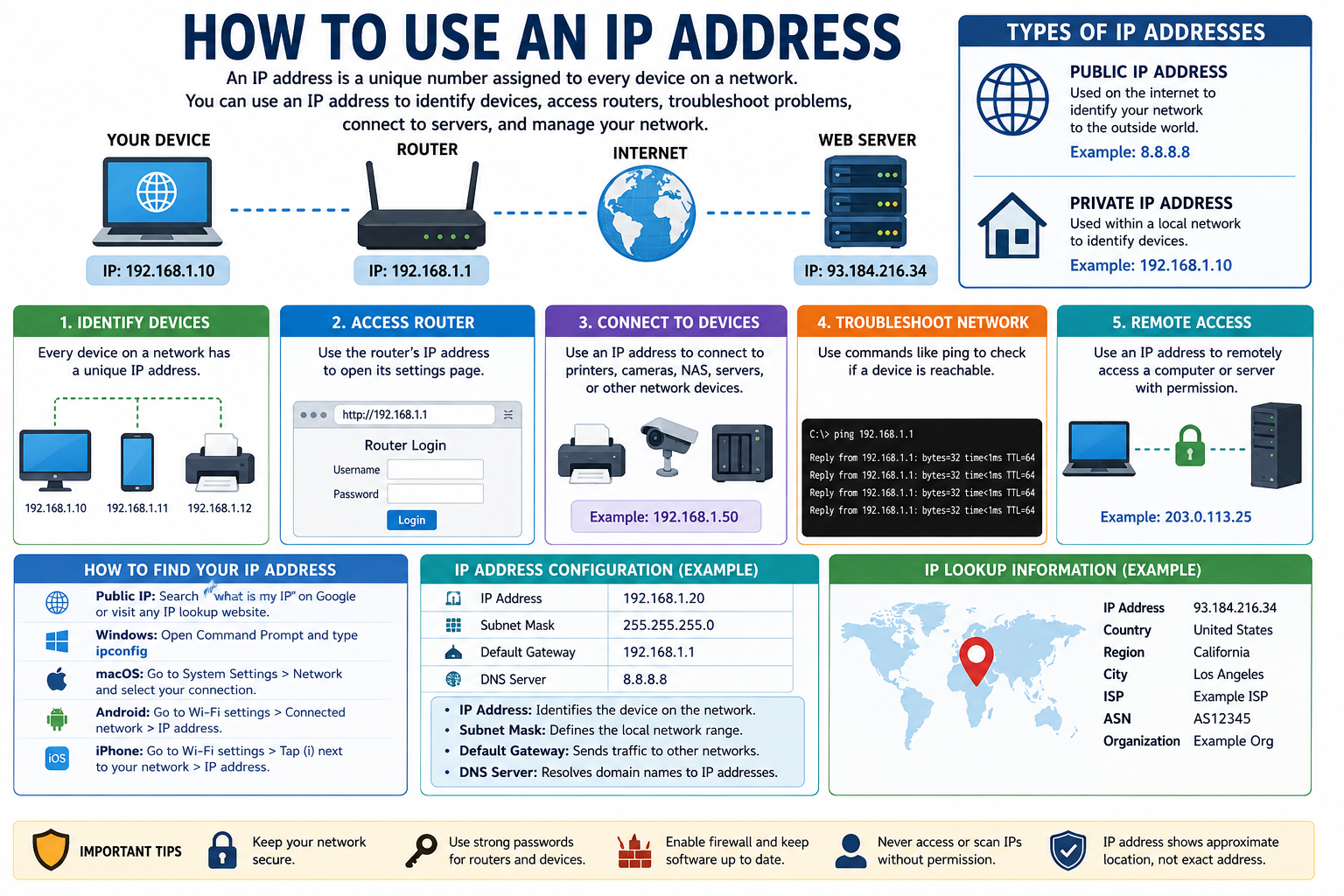
Every day, millions of devices are connected through the internet, and every device requires an address to communicate with other devices. The name given to such an address is an IP address. If you are visiting any websites, working on any applications online, watching videos, or accessing a server, your device will use the IP address to communicate via the internet.
An IP Address Lookup is a useful way to find information associated with a particular IP address. Depending on the available data, an IP lookup can show information such as the approximate location, Internet Service Provider (ISP), organization, hostname, IP version, and network details.
For webmasters, developers, network administrators, cybersecurity experts, and regular internet users, IP Address Lookup can be a very handy process to know about.
This tutorial is aimed at helping you learn about IP addresses, the process of IP Address Lookup, what can be found out from the process, where and how it can be used, along with its shortcomings and effective usage.
What Is an IP Address?
Internet Protocol address is a number given to devices and network interfaces for communicating on a network.
It is like an address that is used in internet communication. For example, when you log into a website, your computer communicates with the server of the website you are accessing. The IP address helps in directing the flow of traffic on the network.
There are two main types of IP addresses:
- IPv4
- IPv6
IPv4 Address
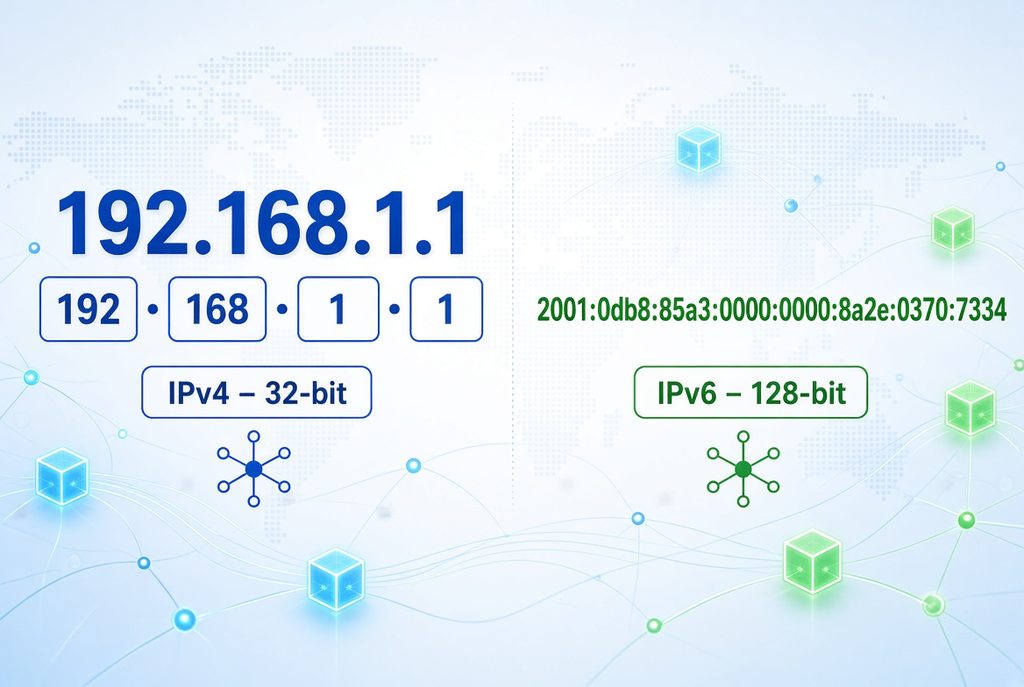
IPv4 is the older and most widely recognized IP addressing system. An IPv4 address consists of four numerical sections separated by periods.
For example:
192.168.1.1
Each section can contain a number from 0 to 255.
IPv4 provides approximately 4.3 billion possible addresses. Because the number of internet-connected devices has grown dramatically, IPv4 addresses have become limited.
IPv6 Address
IPv6 was developed to provide a much larger number of IP addresses.
An IPv6 address uses hexadecimal characters and is separated by colons.
For example:
2001:0db8:85a3:0000:0000:8a2e:0370:7334
IPv6 provides an enormous address space, making it suitable for the continued growth of internet-connected devices.
What Is IP Address Lookup?
IP Address Lookup is the process of checking an IP address against databases and network information sources to discover information associated with that address.
When you enter an IP address into an IP lookup tool, the tool may return several details.
Depending on the database and IP type, these details may include:
- IP address
- IP version
- Country
- Region
- City
- Approximate latitude and longitude
- ISP
- Organization
- Autonomous System Number (ASN)
- Hostname
- Network range
- Time zone
- Proxy or VPN indicators
- Hosting provider information
The exact information varies from one IP address to another.
How Does IP Address Lookup Work?
IP Address Lookup software does not automatically gather all the data about an internet user. Rather, it queries its databases for information regarding the IP ranges and corresponding networks to which it belongs.
The basic process usually works like this:
Step 1: Enter an IP Address
First, you enter an IPv4 or IPv6 address into an IP lookup service.
For example:
8.8.8.8
Step 2: The Tool Checks IP Databases
The lookup service checks the IP address against one or more databases.
These databases may contain information about:
- Network ownership
- ISP
- ASN
- Geographic estimates
- Hosting networks
- Organization
- Abuse contacts
Step 3: The Information Is Matched
The system identifies which network or IP range the address belongs to.
For example, the address may belong to an ISP, cloud provider, university, business, or hosting company.
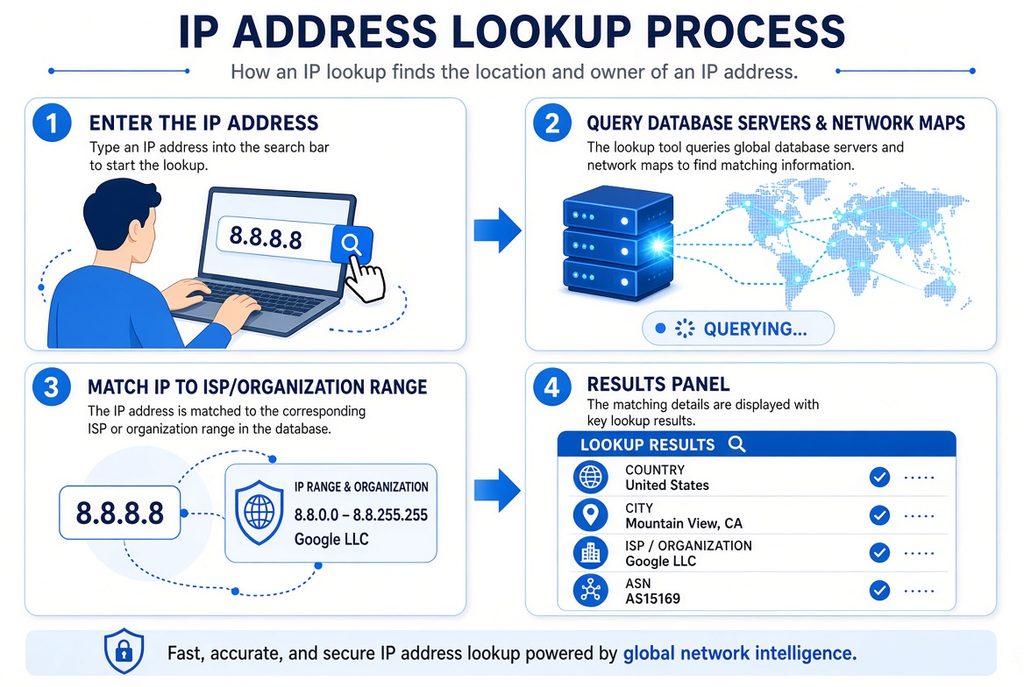
Step 4: Results Are Displayed
The tool then presents the available information in an easy-to-read format.
The results may include the country, city, ISP, organization, hostname, and other network information.
What Information Can an IP Address Lookup Show?
The information available through an IP Address Lookup depends on the IP address and the data sources used by the lookup service.
Here are some of the most common details.
1. IP Address
The first and most obvious result is the IP address itself.
For example:
IP Address: 8.8.8.8
This helps confirm which address you are researching.
2. IP Version
The tool may tell you whether the address is IPv4 or IPv6.
This can be useful for network troubleshooting and technical analysis.
3. Country
An IP lookup can often estimate the country associated with an IP address.
For example:
Country: United States
However, IP geolocation should be considered an approximation rather than an exact physical location.
4. Region or State
Some databases can provide an estimated region, state, or province.
The accuracy can vary significantly between IP addresses.
5. City
An IP lookup may also display an estimated city.
Nevertheless, IP geolocation at a city level is sometimes inaccurate because the results could be showing the registered location of the ISP and not necessarily the location of the user.
6. ISP
ISP stands for Internet Service Provider.
An IP lookup may identify the company responsible for providing internet connectivity for the IP address.
Examples include:
- Broadband providers
- Mobile network operators
- Business internet providers
- Hosting companies
- Cloud providers
7. Organization
The lookup result may identify an organization associated with the IP address.
This can be useful when investigating business networks, hosting providers, or cloud infrastructure.
8. ASN
An Autonomous System Number, or ASN, identifies a network operated by an organization.
ASN information is especially useful for network administrators, cybersecurity researchers, and technical professionals.
9. Hostname
Some IP addresses have a reverse DNS hostname.
For example, a hostname may provide clues about the organization or network associated with an IP address.
10. Time Zone
Some IP databases provide an estimated time zone associated with the IP’s geographic location.
This can be useful for analyzing traffic patterns and troubleshooting regional access issues.
IP Address Lookup vs IP Geolocation
These terms are often used together, but they are not exactly the same.
IP Address Lookup is the broader process of finding information associated with an IP address.
IP Geolocation focuses specifically on estimating the geographic location associated with that IP address.
For example, an IP lookup may provide:
- ISP
- ASN
- Organization
- Hostname
- Country
- Region
- City
IP geolocation is mainly concerned with location-related information.
Can an IP Address Lookup Find Someone’s Exact Location?
False. An IP Address Lookup cannot determine the exact address of a person or their geographical location.
The geolocation services of the IP address database only give an estimate.
For instance, an IP address may belong to a specific city, but the individual may be located somewhere else within the coverage of the service provider’s network.
Several factors can affect accuracy, including:
- ISP network architecture
- Mobile networks
- VPNs
- Proxy servers
- Corporate networks
- Cloud infrastructure
- Dynamic IP addresses
- Database update frequency
Therefore, an IP address should not be treated as a precise GPS location.
Public IP vs Private IP Address
Understanding the difference between public and private IP addresses is important when using an IP Address Lookup tool.
Public IP Address
Public IP addresses are utilized for communication on the public Internet.
A router, server, or any other infrastructure that has been made available on the internet could have a public IP address allocated to it.
Public IP addresses can typically be investigated via internet-based IP address lookup services.
Private IP Address
Private IP addresses are used inside local networks.
Common private IPv4 ranges include:
- 10.0.0.0 – 10.255.255.255
- 172.16.0.0 – 172.31.255.255
- 192.168.0.0 – 192.168.255.255
For example:
192.168.1.10
is typically a private local-network address.
A public IP lookup database cannot normally provide a geographic location for a private IP address because it is not globally routable on the public internet.
Why Use an IP Address Lookup?
There are many legitimate reasons to perform an IP lookup.
Website Troubleshooting
Website administrators can use IP information to investigate unusual traffic, server connections, or access problems.
If visitors report connection issues from a particular network, an administrator can examine the associated IP information.
Cybersecurity
Security professionals may use IP lookup data during investigations.
For example, IP information can help identify whether traffic is associated with:
- A residential ISP
- A cloud provider
- A hosting company
- A known proxy network
- A VPN service
- A suspicious network
IP information is only one part of a larger security investigation.
Network Administration
Network administrators can use IP information to understand network traffic and troubleshoot connectivity problems.
ASN and ISP information can be particularly useful when diagnosing routing or connectivity issues.
Website Analytics
Web owners have the ability to study information associated with IP addresses in order to obtain a broader view of their users.
It can be understood that visitors are coming from different countries.
Present-day analytics tools utilize privacy-friendly techniques and must adhere to privacy laws.
Spam and Abuse Investigation
In the case where a website is subject to unwanted visits, the administrator may look into the origin network.
Using an IP lookup, one may find out about the ISP, web host, or entity owning the particular IP address.
SEO and Local Marketing
If a site is receiving unwanted traffic continuously, then the website administrators will look into it.
The ISP associated with the IP address can be found by conducting an IP lookup
How to Perform an IP Address Lookup
Using an IP lookup service is usually simple.
Step 1: Find the IP Address
First, identify the public IP address you want to investigate.
This could be:
- Your own public IP
- A website server IP
- A known network address
- An IP shown in server logs
Step 2: Open an IP Lookup Tool
Choose a reputable IP lookup service.
Step 3: Enter the IP Address
Paste the IP address into the search field.
Step 4: Start the Lookup
Submit the address.
The tool will query its available databases.
Step 5: Review the Results
Look at the available information, such as:
- Country
- Region
- City
- ISP
- Organization
- ASN
- Hostname
- Network information
Step 6: Interpret the Results Carefully
Do not assume every result is exact.
For example, a city shown by an IP lookup database may be the approximate location of the ISP’s infrastructure rather than the user’s actual location.
Is IP Address Lookup Accurate?
The accuracy level of IP lookup can vary.
Country-level data tends to be more accurate than city-level data, although this does not always guarantee accuracy.
Accuracy can be affected by:
VPNs
When someone connects through a VPN, the IP lookup normally sees the VPN server’s IP rather than the user’s original public IP.
Proxy Servers
Proxy servers can also change the visible IP address.
Mobile Networks
Mobile carriers may use large networks that make geographic identification more difficult.
Dynamic IP Addresses
Many ISPs assign dynamic IP addresses that can change over time.
Cloud Providers
Cloud and hosting IP addresses may represent data centers rather than individual users.
Database Updates
IP geolocation databases need regular updates. If information changes faster than a database is updated, the lookup may return outdated information.
What Is Reverse IP Lookup?
One of the techniques associated with forward IP lookup is the Reverse IP lookup.
It involves the determination of domains or services associated with an IP address. For instance, a reverse IP lookup can give domains that have been associated with a particular IP address in the past.
However, results can be incomplete or inaccurate because:
- Websites can move between servers.
- Shared hosting can contain many domains.
- CDN services can hide the origin server.
- DNS records can change.
- Some domains may use the same infrastructure.
Reverse IP information should therefore be treated as a clue rather than definitive proof of ownership or hosting.
IP Address Lookup for Website Owners
Website owners can benefit from understanding IP information.
Server logs may contain IP addresses associated with requests.
By analyzing these addresses, website administrators can identify patterns such as:
- Repeated requests
- Automated traffic
- High-volume connections
- Suspicious behavior
- Geographic traffic patterns
- Network providers
However, an IP address alone does not prove who performed an action.
Multiple people may share one public IP address, particularly when they use:
- Office networks
- Schools
- Hotels
- Public Wi-Fi
- Mobile carrier networks
- NAT systems
IP Address Lookup and Privacy
IP addresses can be considered personal or personal-related data in some legal contexts, depending on jurisdiction and circumstances.
Website owners should therefore handle IP information responsibly.
Good practices include:
- Collect only necessary information.
- Protect server logs.
- Limit access to IP-related data.
- Follow applicable privacy regulations.
- Avoid claiming that an IP identifies a specific individual.
- Use IP information only for legitimate purposes.
An IP address can provide network information, but it should not automatically be treated as someone’s identity.
Can You Hide Your IP Address?
Users of the Internet may utilize various forms of technology to conceal their IP addresses when visiting websites.
In the case of using a VPN service, websites will usually be able to see the IP address of the server and not that of the original IP address.
Concealing one’s IP address does not necessarily mean complete anonymity.
Other forms of technology could help identify you, such as:
- Browser information
- Cookies
- Account logins
- Device identifiers
- DNS information
- Application behavior
Privacy is therefore broader than simply changing an IP address.
IP Address Lookup for Cybersecurity
IP lookup can be useful in cybersecurity investigations, but it should be combined with other evidence.
Security teams may investigate:
- Suspicious login attempts
- Unusual server traffic
- Automated requests
- Brute-force attempts
- Malware-related traffic
- Spam
- Network abuse
The result of an IP lookup can provide information about the organization that owns the address.
For instance, when thousands of requests from a certain IP range are detected as suspicious, security experts may perform further investigation into the network and decide if additional protection is necessary.
Common IP Lookup Mistakes
There are several common mistakes people make when interpreting IP lookup results.
Mistake 1: Treating the City as an Exact Location
The city displayed by an IP database is usually an estimate.
Mistake 2: Assuming an IP Identifies a Person
An IP address generally identifies a network connection or internet endpoint, not a specific person.
Mistake 3: Ignoring VPNs
VPNs can make the visible IP belong to the VPN provider rather than the actual user.
Mistake 4: Assuming Every Database Is Identical
Different IP databases can produce different results.
Mistake 5: Using IP Data as the Only Evidence
IP information should be combined with other technical information when making important decisions.
Frequently Asked Questions About IP Address Lookup
What is an IP Address Lookup?
An IP Address Lookup is a technique used to obtain information that is related to an IP address. The information could include the country, estimated city, ISP, organization, ASN, hostname, and network information.
Can an IP lookup show my address?
Usually, an IP lookup cannot show your exact home address. It generally provides an approximate geographic location and network information.
Can I look up any IP address?
You can generally look up publicly routable IP addresses. Private IP addresses such as 192.168.x.x are not normally associated with public geographic lookup information.
Does an IP address reveal someone’s identity?
No. An IP address by itself does not normally reveal a person’s name or identity.
Why does my IP location show the wrong city?
Your ISP may route traffic through infrastructure located in another city, or the IP database may have outdated or approximate geographic information.
Does a VPN change my IP address?
A VPN normally changes the public IP address visible to websites by routing traffic through a VPN server.
What is the difference between IPv4 and IPv6?
IPv4 uses 32-bit addresses, while IPv6 uses 128-bit addresses. IPv6 provides a dramatically larger address space.
Is IP geolocation always accurate?
No. IP geolocation is an estimate. Accuracy can vary based on the ISP, network type, VPN usage, mobile networks, and the quality of the geolocation database.
Can an IP lookup identify a website owner?
Not necessarily. An IP lookup may identify a network or hosting provider, but it does not automatically identify the person or company that owns a website.
Is IP Address Lookup legal?
Using publicly available IP information for legitimate purposes is generally acceptable, but how IP data is collected, stored, and used can be subject to privacy and data-protection laws.
Final Thoughts
An IP Address Lookup is a useful tool for understanding internet addresses and the networks behind them. It can provide valuable information such as the approximate geographic location, ISP, organization, ASN, hostname, and network details associated with an IP address.
An IP lookup can prove helpful when troubleshooting websites, network management, cyber investigation, traffic analysis, and in any kind of technical research.
But there are certain drawbacks to the information that is provided by an IP lookup tool. First of all, it is not guaranteed that an IP address will give away a specific individual’s name, and geographical information has to be considered an estimate only. In order to receive accurate results, IP lookup information has to be used along with other technical information.