In today’s economy that heavily relies on digitalization, the cloud computing infrastructure has moved from being an IT indulgence to becoming a necessity. The increasing complexity of web apps, demands for low latency by e-commerce websites, and the need for isolation by software development pipelines are making the shared hosting environment obsolete.
Enter VPS reseller hosting—one of the most profitable, scalable, and operationally efficient business models in the web hosting industry.
Whether you are an owner of a digital marketing agency, an IT consultancy, a freelancer programmer, or an entrepreneur in the technology field, VPS reseller hosting can make use of your enterprise-level data center facilities without spending millions on the physical hardware and network infrastructure.
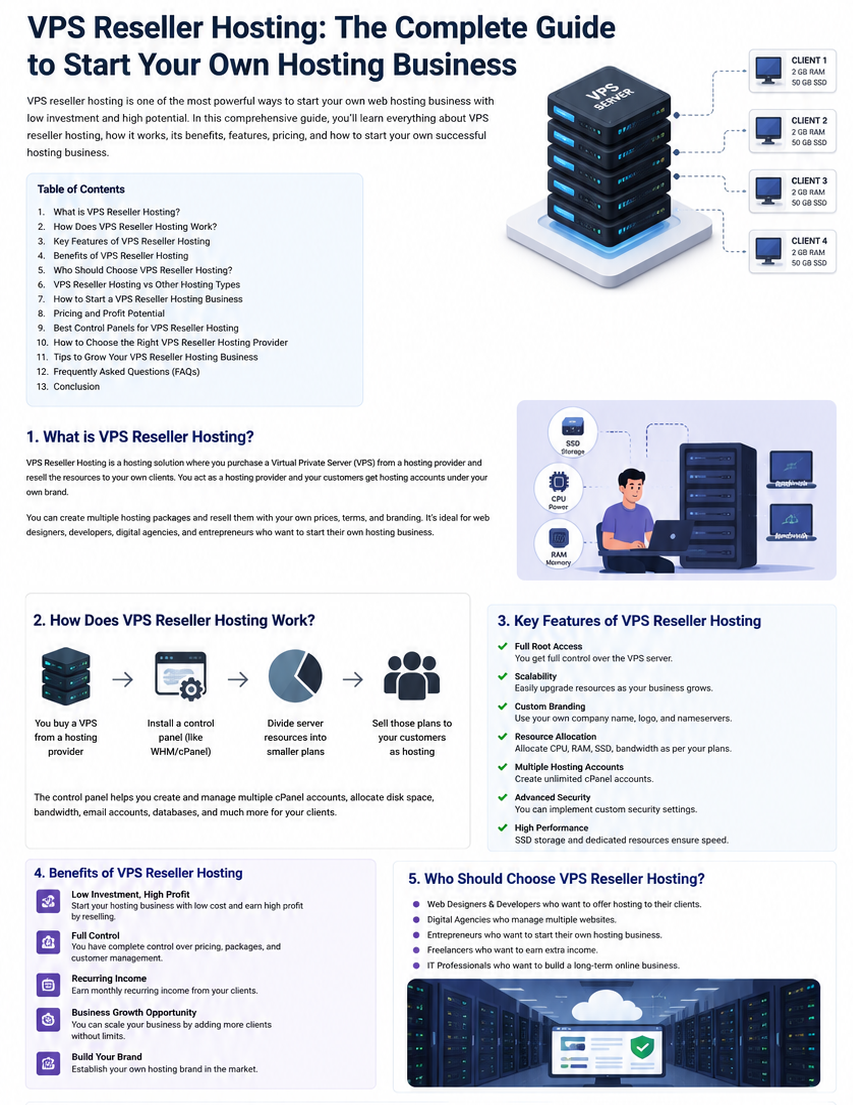
In this comprehensive, deep-dive guide, we will explore everything you need to know about VPS reseller hosting: how it works at a technical level, how to build a white-labeled hosting brand around it, how to architect your automation stack, and how to maximize your recurring revenue.
1. What Is VPS Reseller Hosting?
To understand VPS reseller hosting, we must first dissect its core technologies: Virtual Private Servers (VPS) and Reseller Architecture.
The Anatomy of a Virtual Private Server (VPS)
Virtual Private Server is established by way of utilizing a hypervisor, which is nothing but a unique software layer that acts as an intermediary between the underlying physical host (like KVM, Proxmox, VMware) and the hardware resources such as CPU, memory, NVMe hard drives, and network bandwidth.
Each VPS operates as an independent server with its own:
- Dedicated Operating System (OS): Ubuntu, AlmaLinux, Debian, CentOS, or Windows Server.
- Full Root / Administrative Access: Allowing total customizability to install custom runtime environments, software stacks, and kernel modules.
- Guaranteed Compute & Memory: Dedicated vCPU threads and RAM allocations that are not shared with or degraded by neighbor instances on the same hypervisor host.
The Reseller Business Model
In a normal reseller model, your infrastructure partner will provide a server resource master pool that contains items such as 64 vCPU cores, 256 GB RAM, 4 TB NVMe, and an IP address block.
As a VPS reseller hosting provider, you take this bulk wholesale allocation and partition it into custom-sized Virtual Private Servers under your own company brand. You determine:
- Resource Specifications: Custom configurations of vCPU, RAM, Disk Space, and Bandwidth.
- Retail Pricing & Margins: Setting price points based on your target market.
- Branding & Identity: Complete white-labeling across billing dashboards, control panels, server hostnames, and IP WHOIS records.
- Service Level & Management: Deciding whether to offer self-managed (unmanaged) or fully managed hosting services.
2. Technical Architecture: How VPS Reseller Hosting Works Behind the Scenes
Understanding the backend stack of a VPS reseller hosting platform is crucial for ensuring uptime, security, and smooth customer provisioning. The architecture consists of four distinct operational layers:
+———————————————————————–+
| CLIENT & INTERFACE LAYER |
| (Client Portal, Custom Control Panel, Billing UI) |
+———————————————————————–+
|
v
+———————————————————————–+
| AUTOMATION & ORCHESTRATION |
| (WHMCS / Blesta API -> Virtualizor / SolusVM) |
+———————————————————————–+
|
v
+———————————————————————–+
| HYPERVISOR LAYER |
| (KVM / Proxmox / OpenStack Resource Virtualization) |
+———————————————————————–+
|
v
| PHYSICAL INFRASTRUCTURE |
| (Bare-Metal Nodes, NVMe Storage Arrays, 10Gbps Uplinks) |
Layer 1: Bare-Metal Infrastructure & Hypervisors
In the bottom layer, there is an enterprise server with multiple sockets, ahigh-coree CPU (e.g., AMD EPYC or Intel Xeon CPUs), ECC memory, and NVMe SSD drives organized in RAID 10.
The hypervisor manages the hardware level. Kernel-based Virtual Machine (KVM) is the industry standard for modern VPS reseller hosting. Unlike older container technologies (like OpenVZ), KVM provides complete hardware virtualization. Each KVM guest runs its own isolated OS kernel, preventing any single tenant from monopolizing host memory or kernel routines.
Layer 2: Management & Provisioning Modules
To resell effectively, you need control panels that interface directly with the hypervisor nodes. Virtualization control panels like Virtualizor, SolusVM, or Proxmox VE expose RESTful APIs.
When a customer orders a VPS on your website, your billing software communicates with the master management node via API, instructing it to:
- Provision a new KVM instance with specified CPU, RAM, and storage limits.
- Assign a dedicated public IPv4 and IPv6 address.
- Template-install the chosen Operating System (e.g., Ubuntu 24.04 LTS or AlmaLinux 9).
- Return root login credentials to the end user automatically within seconds.
Layer 3: White-Label Isolation & Networking
To keep your wholesale provider completely invisible, your VPS reseller hosting system uses white-label networking:
- Custom PTR / Reverse DNS Records: Mapping IP addresses directly to your domain name (e.g., vps1.yourbrand.com).
- Branded Nameservers: Route client DNS management through your infrastructure (ns1.yourbrand.com, ns2.yourbrand.com).
- Custom Hypervisor Branding: Modifying control panel logos, CSS stylesheets, and email notification headers to ensure zero exposure of the upstream host.
3. VPS Reseller Hosting vs. Traditional Shared Reseller Hosting
An interesting topic that many web professionals ask is whether VPS reseller hosting is different from normal cPanel/WHM shared reseller hosting. Although both can be used to provide web hosting services, the two are vastly different when it comes to their customers.
Comparison Table: VPS Reseller vs. Shared Reseller Hosting
| Feature / Metric | Shared Reseller Hosting | VPS Reseller Hosting |
| Server Resource Isolation | Low (Shared CPU, RAM, and Web Server across tenants) | High (Dedicated vCPU, isolated RAM & NVMe space) |
| Root Access & Custom OS | No (Restricted to user level or WHM account limits) | Yes (Full root/administrator privileges) |
| Target Audience | Small blogs, brochure websites, basic WordPress | Agencies, SaaS apps, e-commerce, high-traffic portals |
| Average Monthly ARPU | $5 – $15 per client | $30 – $200+ per client |
| Software Flexibility | Fixed stack (Apache/Nginx, PHP, MySQL) | Total freedom (Node.js, Docker, Python, Redis, Postgres) |
| Performance Predictability | Variable (Prone to “noisy neighbor” impacts) | Guaranteed (Virtualization enforces strict resource caps) |
| Technical Support Load | Application-level (WordPress bugs, email issues) | OS-level or Managed Service add-ons |
| Profit Potential | Low-margin, high volume | High-margin, mid-to-high volume |
4. Key Advantages of Starting a VPS Reseller Hosting Business
Launching a business built on VPS reseller hosting offers distinct advantages over other online business models.
| ADVANTAGES OF VPS RESELLING |
|
+——————-+—————+—————+——————-+
| | | |
v v v v
+———-+ +——————-+ +——————-+ +——————-+
| Predict- | | High Gross Profit | | Total Operational | | Infinite Scalable |
| able MRR | | Margins (50-70%) | | White-Labeling | | Infrastructure |
1. Predictable Monthly Recurring Revenue (MRR)
The web infrastructure is the most sticky of nearly all software services. Once a customer builds his/her web applications, database, or clients’ infrastructure using your Virtual Private Servers, he/she will never move from there. Therefore, you get a steady stream of MRR with extremely low churn rates.
2. High Profit Margins Through Value-Added Bundling
If you sell unmanaged raw compute power, you compete directly with commodity cloud providers on price. However, VPS reseller hosting allows you to bundle value-added services that dramatically inflate margins:
- Managed Support Package: +$50 to $100/month per server.
- Automated Offsite Snapshots & Backups: +$10 to $30/month.
- Proactive Security Hardening & Monitoring: +$25 to $50/month.
- Control Panel Licenses (cPanel, Plesk, DirectAdmin, Webmin): Retained markup.
3. Complete Brand Ownership (White-Label Freedom)
Your clients never interact with your upstream vendor. Your invoices, control panel portals, error logs, support tickets, and server hostnames reflect your brand. This builds enterprise equity—you are creating a business asset with tangible valuation multiples, rather than merely acting as an affiliate.
4. Zero Capital Expenditure (CapEx)
Building a physical data center node requires tens of thousands of dollars in server hardware, rack space, power units, router switches, and bandwidth commits. With VPS reseller hosting, you convert high CapEx into predictable, scalable Operational Expenditure (OpEx). You only pay for additional wholesale server capacity as your paying customer base expands.
5. Ideal Target Markets for VPS Resellers
To scale your VPS reseller hosting business efficiently, avoid trying to serve “everyone”. Position your infrastructure offerings around specific industries and application use cases.
+——————————————————————————–+
| HIGH-VALUATION TARGET MARKETS |
| 1. Web Agencies & App Developers —> Requires staging & production VPS |
| 2. E-Commerce Stores (Woo/Magento) —> Requires dedicated NVMe & RAM buffers |
| 3. SaaS & Software Startups —> Requires isolated API environments |
| 4. Remote Teams & Enterprises —> Requires private VPNs & CRM servers |
Digital Agencies and Web Design Studios
There are a number of customer websites hosted by digital agencies. With shared hosting, there is poor website performance in all hosted sites, and dedicated hosting proves to be expensive. It is possible to provide digital agencies with reseller plans as well as managed virtual private server plans per their high-value customers to solve their problems.
E-Commerce Merchants (WooCommerce, Magento, OpenCart)
Fast database response is critical for online shops to avoid shopping cart abandonment. Shared hosting solutions often cannot cope with the loads generated during simultaneous checkouts. With high-speed NVMe VPS reseller hosting tuned up for database caching (Redis/Memcached) and fast PHP processing, you will be able to attract eCommerce customers ready to pay between $50 and $200 per month.
Software Developers & SaaS Startups
Developers need clean, root-level environments to run Docker containers, Node.js applications, Python/Django apps, and custom database clusters. They require fast provisioning, API access, quick snapshot restores, and scalable resources—features provided natively by a robust VPS reseller hosting platform.
6. Financial Blueprint: Pricing, Overhead, and Profit Margins
Let’s break down a practical financial model for a VPS reseller hosting business to illustrate potential earnings.
Wholesale Overhead Costs (Monthly Base)
Suppose you purchase a wholesale VPS reseller allocation or a cluster of high-spec dedicated server nodes from your provider:
- Wholesale Resource Allowance: $300/month (Allocating 128 vCPU Cores, 512 GB RAM, 8 TB NVMe Storage, 50 TB Bandwidth, 64 IPv4 Addresses).
- Billing Automation License (WHMCS Starter/Plus): $20 – $40/month.
- Control Panel License (Virtualizor / SolusVM module): $10 – $20/month.
- Domain & Misc Overhead: $10/month.
- Total Operating Overhead: ~$360 / month
Retail Product Packaging Strategy
You divide your wholesale resources into three standardized VPS hosting tiers:
| RETAIL VPS PRODUCT TIERS |
| Tier 1: Developer VPS | 2 vCPU | 4 GB RAM | 60 GB NVMe | $20/mo |
| Tier 2: Business VPS | 4 vCPU | 8 GB RAM | 120 GB NVMe | $40/mo |
| Tier 3: Enterprise VPS | 8 vCPU | 16 GB RAM | 240 GB NVMe | $80/mo |
+————————————————————————–+
Projected Monthly Revenue and Profitability
Assuming a client distribution across your tiers:
30 x Developer VPS ($20/mo) = $600
15 x Business VPS ($40/mo) = $600
5 x Enterprise VPS ($80/mo) = $400
—————————————–
Gross Monthly Revenue = $1,600
Less Monthly Overhead Costs = -$360
—————————————–
Net Monthly Operating Profit = $1,240 / month
Net Profit Margin = 77.5%
By adding Managed VPS Services (e.g., charge an additional $40/month for proactive updates, backups, and security monitoring), 20 managed customers can add $800/month in pure profit without increasing your baseline hardware expense.
7. Step-by-Step Implementation Guide to Launching Your Business
Setting up a white-label VPS reseller hosting infrastructure requires careful configuration to ensure automated provisioning and security. Follow this step-by-step roadmap.
+———————————————————————–+
| LAUNCH ROADMAP TIMELINE |
+———————————————————————–+
| STEP 1: Select Infrastructure Partner & Wholesale Plan |
| STEP 2: Establish Corporate Identity, Domain & White-Label Branding |
| STEP 3: Install & Configure WHMCS / Blesta Billing Software |
| STEP 4: Integrate Virtualization Panel (Virtualizor / SolusVM) |
| STEP 5: Configure Payment Gateways & Automated OS Provisioning |
| STEP 6: Execute Security Hardening & SLA / Terms Framework |
| STEP 7: Launch Marketing Campaigns & Client Onboarding |
+———————————————————————–+
Step 1: Selecting the Right Infrastructure Partner
Your reseller hosting business is only as strong as your upstream partner’s data center capabilities. When evaluating potential wholesale providers, ensure they meet these core criteria:
- Enterprise NVMe Storage: Ensure storage runs on PCIe Gen4 or Gen5 NVMe arrays in RAID 10 configurations. Standard SATA SSDs or HDDs are unacceptable bottlenecks for modern VPS workloads.
- Strict KVM Virtualization: Avoid providers relying on container-based software (like LXC or OpenVZ) that allow resource overselling.
- 10 Gbps Redundant Uplinks: Low-latency networking with multiple tier-1 transit providers.
- Proactive Hardware SLA & DDoS Mitigation: Inherent network-level protection against Layer 3, 4, and 7 DDoS attacks.
- Comprehensive API Ecosystem: Full REST API functionality to interact with your billing and provisioning modules.
Step 2: Setting Up the White-Label Branding Stack
To maintain a completely private-label operation, configure these elements:
- Domain & SSL: Register a clean domain name for your hosting brand and install Wildcard SSL certificates.
- Custom Nameservers: Point custom glue records to your assigned reseller control IPs:
- ns1.yourhostingbrand.com
- ns2.yourhostingbrand.com
- Custom Hostnames & Reverse DNS (rDNS): Request that your provider set PTR records for your allocated IPv4 addresses to match your brand’s structure (e.g., node01.yourhostingbrand.com).
Step 3: Installing & Automating Your Billing Engine (WHMCS / Blesta)
WHMCS is the standard billing platform in the hosting industry, providing customer management, ticketing, and server provisioning capabilities.
<?php
// WHMCS Server Provisioning Configuration Example (Conceptual)
return [
‘module_name’ => ‘Virtualizor_KVM_Reseller’,
‘api_endpoint’ => ‘https://master.yourhostingbrand.com:4085/api/’,
‘api_key’ => ‘YOUR_ENCRYPTED_API_KEY_HERE’,
‘api_pass’ => ‘YOUR_ENCRYPTED_API_PASS_HERE’,
// Server Parameters Passed During Auto-Provisioning
‘default_params’ => [
‘virt’ => ‘kvm’,
‘ips’ => 1,
‘space’ => ’60GB’,
‘ram’ => ‘4096MB’,
‘bandwidth’ => ‘2000GB’,
‘os_template’ => ‘ubuntu-24.04-x86_64’,
‘swap’ => ‘2048MB’,
]];
?>
Through this setup, as soon as a customer’s payment clears via Stripe or PayPal, WHMCS triggers the API, builds the VPS instance, emails the client their login details, and begins recording bandwidth usage—requiring zero manual intervention.
8. Crucial Security, Snapshot, and Compliance Frameworks
Running a reliable VPS reseller hosting business requires implementing strict security protocols to safeguard both your clients and your infrastru
| ENTERPRISE SECURITY STACK |
| LAYER 1: Network Edge Firewall & DDoS Shield |
| LAYER 2: Hypervisor Isolation & Rate Limiting |
| LAYER 3: OS Level Security (Fail2ban, ModSecurity, SSH Keys) |
| LAYER 4: Automated Offsite Snapshots & Disaster Recovery |
1. Spam & Abuse Prevention
A common challenge facing hosting providers is preventing malicious actors from using VPS instances to send bulk spam emails or launch outgoing scanning attacks.
- Block Outbound Port 25: Block SMTP Port 25 by default across all new VPS instances. Require clients to submit an ID verification ticket or utilize an authenticated SMTP relay (like SendGrid or Mailgun) before unblocking outbound mail ports.
- Automated Abuse Detection: Implement automated scripts that monitor outbound network traffic spikes and CPU usage anomalies, temporarily quarantining rogue instances before upstream providers issue network blocks.
2. Automated Snapshot & Offsite Backups
Never rely on a single local server node for client data storage.
- Block-Level Snapshots: Configure automated daily or weekly block-level snapshots using incremental backup engines.
- Secondary Storage Nodes: Store offsite backup copies on geographically isolated object storage (e.g., S3-compatible storage or dedicated backup servers).
- Restoration Testing: Periodically test backup restoration speeds to guarantee compliance with your Recovery Time Objectives (RTO) and Recovery Point Objectives (RPO).
9. Marketing Strategies: How to Acquire High-Value VPS Clients
Once your technical platform is operational, focus on acquiring clients. Competing head-to-head with multi-billion-dollar hyperscalers (like AWS or Google Cloud) on price alone is a losing strategy. Instead, position your VPS reseller hosting business as a high-touch, specialized performance service.
+————————————————————————+
| CLIENT ACQUISITION ENGINE |
+————————————————————————+
| 1. Local Agency Partnerships (Co-location, Managed Hosting Bundles) |
| 2. Developer Community Inbound Marketing & Open-Source Guides |
| 3. High-Touch White-Glove Migration Services |
| 4. Niche Performance Benchmarks (E-commerce Speed Guarantees) |
Strategy A: Free White-Glove Migrations
The single greatest barrier for customers wanting to switch hosts is the technical friction of moving their files, databases, and DNS records. Offer 100% Free Managed Migrations. Have your support team migrate their current server content, optimize their database configurations, and test performance. This service drastically increases sales conversions.
Strategy B: Localized and Industry-Specific SEO
Instead of targeting broad terms like “Cheap VPS”, optimize your search strategy around high-intent, targeted queries:
- “Managed Magento VPS Hosting in [Your City/Region]”
- “High-Performance Node.js Application Hosting for Developers”
- “HIPAA-Compliant Private VPS Servers for Medical Apps”
Targeting specific niches lets you attract clients who prioritize reliability, compliance, and dedicated support over finding the absolute cheapest hosting option.
10. Frequently Asked Questions (FAQs)
What is the main difference between VPS reseller hosting and dedicated server hosting?
In dedicated server hosting, you rent an entire physical server machine. With VPS reseller hosting, a larger physical machine is virtualized into multiple isolated private servers. Reselling VPS instances allows you to start with smaller allocations and scale compute resources incrementally without paying for unused bare-metal hardware.
Do I need advanced system administration skills to start a VPS reseller business?
Although basic knowledge about Linux command-line syntax, networking, and server management can prove useful, it is not necessarily required. With the help of automated billing software such as WHMCS and control panel solutions like Virtualizor, tasks such as OS installation, rebooting servers, and adjusting resource capacity are fully automated. Moreover, selecting a managed upstream provider lets you delegate technical issues at the level of the hypervisor to their engineers.
Can my customers tell I am using a reseller service?
No. Quality VPS reseller hosting is completely white-labeled. Your clients will interact exclusively with your branded domain, customized billing portals, custom nameservers, and branded server hostnames.
Which operating systems can I offer to my clients?
Any operating system that is supported by KVM virtualization can be provided. They include various Linux operating systems (Ubuntu, AlmaLinux, Debian, CentOS, Rocky Linux) as well as Windows server versions.
Final Thoughts: Launching Your Cloud Empire
VPS Reseller Hosting provides you with a direct and very lucrative route to the subscription-based infrastructure space. Without the need to make any investments in hardware costs, this business model allows you to concentrate on building your brand and providing top-notch customer service.
By choosing a good infrastructure provider, implementing automation, and targeting premium niches, you will be able to create a scalable web hosting business.