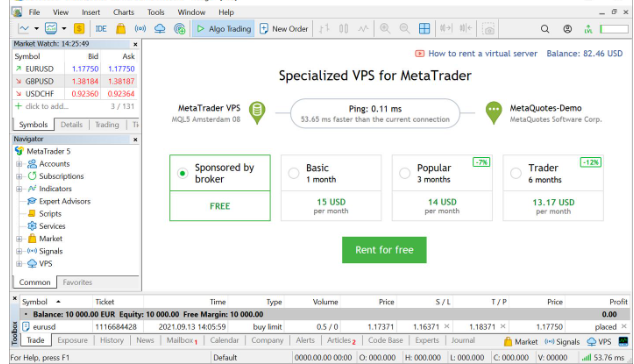
Should you be looking to take automated forex trading, Expert Advisors, MT4, or MT5 seriously, then the right VPS forex hosting can help you achieve stability and reliability in your trading setup. A Virtual Private Server means you will be able to access the trading platform from a remote server, which will remain connected even if your personal computer is not.
For many forex traders, the biggest advantage of a VPS is not simply speed. It is the combination of 24/7 availability, stable internet connectivity, low latency, remote access, and a suitable environment for automated trading.
In case it is required that the Expert Advisor should constantly observe the market activity and make trades, then a VPS becomes particularly beneficial since there is no need to leave your PC switched on for the whole day and night. All you have to do is install either MT4 or MT5 on the VPS.
In this tutorial, we will provide you with details about VPS hosting for forex, what its purpose is for traders, what features you need to consider when choosing a VPS host, how to choose a server location, what RAM and CPU you might need, and how to configure a VPS for forex.
What Is VPS Hosting for Forex?
VPS hosting for forex is a virtual private server designed or configured to run forex trading platforms such as MetaTrader 4 and MetaTrader 5.
The VPS is, in effect, a virtual computer housed in an appropriate data center. You will access this computer from wherever you wish by using such programs as Remote Desktop. Once you have logged in to this virtual computer, you can install your trading platform, connect to your broker, set up indicators and Expert Advisors, etc.
The major difference is that the VPS operates independently of your personal computer.
For instance, let’s assume that one is using an EA on their home PC all the time. In case of a power outage, disconnection from Wi-Fi, restarting Windows, or closing MT4 mistakenly, the EA can stop functioning.
With a VPS, your trading platform can continue running on the remote server.
This is one reason VPS services are commonly used by traders who rely on automated strategies.
Why Do Forex Traders Use a VPS?
There are several reasons traders choose VPS hosting for forex.
1. 24/7 Availability
Forex trading operates across global financial markets during the trading week. Automated systems may need to remain active even when you are sleeping or away from your computer.
A VPS can keep MT4, MT5, or an EA running continuously, subject to the provider’s uptime and maintenance.
This is particularly useful for:
- Expert Advisors
- Automated trading strategies
- Trading alerts
- Copy-trading software
- Multiple MT4/MT5 terminals
- Automated indicators and scripts
- Strategies that monitor the market continuously
A VPS does not need to be physically located in your home, and your local computer can be switched off while the remote trading environment continues operating.
2. Lower Network Latency
Latency is the delay in the data travel between the client trading platform and the server.
As for forex traders, the latency may be important due to the need to transfer the order/price information through a network.
The important point is that the location of your VPS relative to your broker’s trading server can be more important than the location of your home.
For instance, if your broker’s trading platform operates in London, the VPS close to or in London may offer a better network path than a VPS operating from another continent.
However, there is no “universal best place for a VPS” – you need to check the connection yourself.
Current VPS providers claim extremely low latency and a geographical position near financial centers, but that doesn’t necessarily mean that this will be your trading latency.
3. More Stable Internet Connection
A home internet connection can experience:
- Wi-Fi problems
- Router failures
- ISP outages
- Power interruptions
- Network congestion
- Temporary disconnections
These problems can interrupt a trading platform.
Professional VPS setup is engineered to run in a data center with network connection and power supply infrastructure.
This does not imply that a VPS cannot go down. There should be no presumption of immunity to outages in any hosting environment.
What is better is that you are switching from the regular residential set-up to the server environment set-up that is designed to work non-stop.
4. Better Environment for Expert Advisors
Expert Advisors are automated programs that can analyze market conditions and execute trading instructions according to predefined rules.
If you run an EA on your personal computer, you generally need to keep:
- Your computer powered on
- MetaTrader running
- Internet connected
- The EA active
- The required charts open
A VPS simplifies this setup.
You can install MT4 or MT5 on the VPS, log in to your trading account, attach the EA to the required chart, and leave the VPS running.
Some forex VPS providers specifically optimize their environments for MetaTrader 4 and MetaTrader 5 and automated trading workloads.
5. Remote Access From Anywhere
Another advantage of VPS hosting for forex is remote access.
You can access your VPS from:
- Desktop computers
- Laptops
- Some tablets
- Other compatible remote-access devices
Your actual trading platform is running on the VPS rather than your local machine.
For example, you could configure MT5 on your VPS at home and later connect to the same VPS from another computer.
This can be convenient for traders who travel or use multiple computers.
VPS Hosting for Forex: What Specifications Do You Need?
Choosing a VPS should not be based only on the lowest monthly price.
You should consider the resources required by your trading setup.
The most important specifications include:
CPU
The CPU affects how efficiently the VPS can process your applications.
A simple MT4 setup with one lightweight EA may not need a powerful CPU.
However, traders running:
- Multiple MT4 terminals
- Multiple MT5 terminals
- Several Expert Advisors
- Strategy-testing workloads
- Resource-intensive indicators
may need more CPU resources.
RAM
RAM is another important consideration.
A small VPS may be sufficient for a basic setup, while multiple terminals and EAs can require significantly more memory.
As a general starting point:
| Trading Setup | Suggested Starting Point |
| 1 MT4 + light EA | 2 GB RAM |
| 1–2 MT4/MT5 terminals | 2–4 GB RAM |
| Several EAs/terminals | 4–8 GB RAM |
| Heavy multi-terminal setup | 8 GB+ RAM |
These represent practical points of reference rather than hard-and-fast requirements. Your real RAM needs will depend on your operating system, MetaTrader software, indicators, EAs, and other software.
Some of the forex VPS providers today offer plans with RAM capacities between 2 GB and 8 GB and more.
SSD or NVMe Storage
Fast storage can help the VPS operate smoothly.
For forex trading, you usually don’t need enormous storage capacity. Instead, reliable and responsive SSD or NVMe storage is generally more useful.
Your storage may contain:
- Windows Server
- MT4/MT5 installations
- EA files
- Indicators
- Historical market data
- Logs
- Templates
- Trading profiles
If you only run a few MetaTrader terminals, you probably don’t need hundreds of gigabytes of storage.
Server Location Is Extremely Important
One of the most important factors when selecting VPS hosting for forex is server location.
Don’t automatically choose the VPS location closest to your home.
Instead, consider the location of your broker’s trading server.
For example:
Your computer → VPS → Broker
In relation to automated trading execution, the network connection to consider would mostly be between the VPS and the broker.
If the VPS is situated near the broker’s setup, then the path through the network could be shorter and possibly have lower latency.
But the distance is not the only factor, as the network routing, data center connectivity, traffic, and broker’s setup are all contributing to the latency.
Thus, you need to check first.
How to Test Forex VPS Latency
Before buying an expensive long-term VPS plan, test the connection if possible.
You can:
- Find your broker’s trading server.
- Choose a VPS location near that server.
- Install MT4 or MT5.
- Log into your trading account.
- Check the platform’s connection information.
- Monitor latency.
- Compare different VPS locations.
Some VPS providers publish latency information to financial data centers or brokers, but your own test is more relevant to your specific broker account.
MetaTrader’s own VPS ecosystem also emphasizes proximity and latency when selecting a virtual hosting environment.
VPS Hosting for Forex and MT4
MetaTrader 4 remains widely used by forex traders and automated trading developers.
A VPS can be useful for MT4 because you can leave the terminal running continuously.
A typical setup looks like this:
VPS Server → Windows → MT4 → Broker → Forex Market
You can install:
- Expert Advisors
- Custom indicators
- Scripts
- Templates
- Trading profiles
After configuring your EA, you can keep the MT4 terminal active on the VPS.
This allows the EA to continue monitoring the market even if your personal computer is turned off.
VPS Hosting for Forex and MT5
MetaTrader 5 offers many of the same VPS use cases.
You can use a VPS to run:
- MT5
- Expert Advisors
- Custom indicators
- Automated strategies
- Multiple trading accounts
MT5 can be particularly useful for traders who need a more advanced trading environment.
The correct VPS specification depends on how many terminals and automated systems you plan to operate.
How to Set Up VPS Hosting for Forex
Setting up a VPS is relatively straightforward.
Step 1: Choose a VPS Provider
Look for a provider that offers:
- Windows VPS
- Stable network connectivity
- Good uptime
- Appropriate server locations
- Sufficient CPU and RAM
- SSD/NVMe storage
- Remote Desktop access
- Security features
- Technical support
Some providers specifically market Windows VPS environments optimized for MetaTrader.
Step 2: Select the Correct Location
Select the one with an efficient network path to your trading server through your broker.
Never select the facility just because of its proximity to you.
For automated trading, check the connectivity between your VPS and the broker’s trading server.
Step 3: Connect Through Remote Desktop
As soon as you purchase your VPS, you receive connection information from the VPS hosting company.
On Windows, you can connect through Remote Desktop Connection.
Once you establish the connection, you will have the Windows desktop running on the server machine.
Step 4: Install MetaTrader
Download and install MT4 or MT5.
Then:
- Open MetaTrader.
- Select your broker.
- Log into your trading account.
- Open the required charts.
- Install your indicators.
- Install your Expert Advisors.
- Configure your trading strategy.
Step 5: Test Your EA
Don’t immediately assume that everything is working correctly.
Check:
- EA status
- Connection status
- Trading permissions
- Journal messages
- Experts tab
- CPU usage
- RAM usage
- Broker connection
- Automated trading settings
Run the system in a demo environment first if you are testing a new strategy.
Security Considerations for Forex VPS
Security is extremely important because your VPS may contain access to your trading account.
Use a strong and unique password.
You should also:
- Keep Windows updated.
- Use appropriate firewall protection.
- Avoid installing unnecessary software.
- Protect your VPS login credentials.
- Avoid sharing your Remote Desktop credentials.
- Monitor unusual login activity.
- Back up important EA files and configurations.
Remember that a VPS protects the technical environment; it does not eliminate trading risk.
Your broker account can still be exposed if your credentials are compromised.
Does a VPS Make Forex Trading More Profitable?
No.
This is one of the most important points to understand.
A VPS can improve the reliability of your trading infrastructure, but it cannot guarantee profitable trading.
A VPS cannot fix:
- A poor trading strategy
- Bad risk management
- Excessive leverage
- A losing Expert Advisor
- Poor market analysis
- Emotional trading
- Bad entry and exit rules
Think of a VPS as infrastructure, not a profit-generating strategy.
If your EA loses money on your computer, moving the same EA to a VPS does not automatically make it profitable.
What the VPS can potentially improve is the reliability and continuity of your execution environment.
Who Should Use VPS Hosting for Forex?
A VPS may be useful for:
Automated Forex Traders
If you use EAs, a VPS can keep your trading platform running continuously.
Scalpers
Traders who care about execution latency may benefit from testing VPS locations near their broker’s infrastructure.
Traders Running Multiple Accounts
A VPS can make it easier to manage multiple trading terminals from one remote environment.
Copy Traders
Some copy-trading systems require the platform to remain online.
Traders Who Travel
You don’t need your primary computer with you if your trading environment is hosted remotely.
Who May Not Need a Forex VPS?
Not every forex trader needs a VPS.
You may not need one if you:
- Trade manually for short periods.
- Only open MT4/MT5 when you are actively trading.
- Don’t use Expert Advisors.
- Don’t require continuous automated monitoring.
- Do not need remote trading infrastructure.
For basic manual trading, your regular computer may be perfectly adequate.
How Much Does VPS Hosting for Forex Cost?
The price depends on:
- RAM
- CPU
- Storage
- Windows licensing
- Server location
- Dedicated or shared resources
- Support
- Backup options
- Uptime commitment
- Network quality
Basic VPS packages can be relatively affordable, but more expensive trading VPS solutions with better hardware or financial data center connection are also available.
Present providers offer great diversity of configurations and prices, so it is essential to compare specifications instead of focusing on the monthly rate.
An affordable VPS is not always the wrong decision—but it may be unsuitable for an advanced automatic trading system.
Common Mistakes When Choosing VPS Hosting for Forex
Mistake 1: Choosing Only by Price
The cheapest VPS may have limited resources or poor network performance.
Mistake 2: Ignoring Server Location
A powerful VPS in the wrong location may provide a worse route to your broker than a smaller VPS located strategically.
Mistake 3: Buying Too Little RAM
Running several terminals and EAs on a low-memory VPS can lead to performance problems.
Mistake 4: Believing Marketing Claims
Claims such as “zero latency” or “guaranteed fastest execution” should be evaluated carefully.
Always test your actual broker connection.
Mistake 5: Not Monitoring the VPS
Installing an EA and forgetting about it is risky.
Regularly check:
- CPU
- RAM
- MT4/MT5 connection
- EA status
- Trading logs
- VPS uptime
VPS Hosting for Forex: Final Checklist
Before purchasing a VPS, ask yourself these questions:
Does it support Windows?
MT4 and MT5 are commonly run on Windows environments, so Windows support can simplify installation and management.
Is the server close to my broker?
Check the actual trading-server location and test latency.
Does it have enough RAM?
Consider the number of terminals, EAs, and indicators you will run.
Is the connection stable?
Look beyond maximum advertised speed. Stable connectivity is important.
Does the provider offer reliable support?
Technical problems can become important when automated trading is involved.
Does the provider offer backups or monitoring?
Backups can help protect your configuration and trading environment.
Can I test the VPS first?
A trial or short-term plan can be useful for checking latency and stability before committing.
Conclusion
VPS hosting for forex can be a valuable part of a professional forex trading setup, especially for traders who use MetaTrader 4, MetaTrader 5, Expert Advisors, or automated trading strategies.
The main benefits include 24/7 availability, stable connectivity, remote access, and potentially lower network latency to your broker.
However, choosing the right VPS requires more than simply searching for the cheapest plan. You should consider the VPS location, broker location, latency, CPU, RAM, storage, uptime, security, and technical support.
For a simple installation of MT4 and MT5, a standard Windows VPS would be enough. Those who work with multiple terminals and automated trading systems might require extra CPU and RAM. Most importantly, test the connection of your VPS with the particular broker you trade with instead of basing your decision on the ads.
The use of a VPS allows for creating a more stable trading environment, although it is not a key to quick earnings or successful trading.